











Microsoft surface pro 12 inch price in Pakistan
₨ 399,999
Contact on WhatsApp, for discount and more information.
Description
💻 Microsoft surface pro 12 inch price in Pakistan
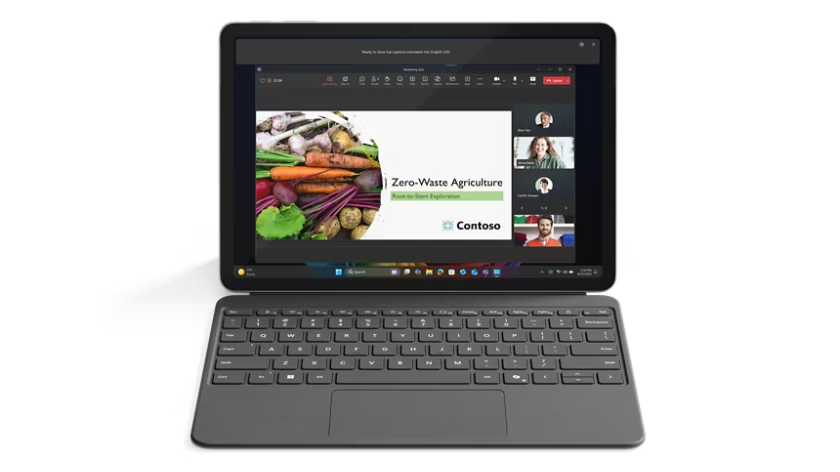
The market for premium 2-in-1 Windows devices has changed dramatically over the last few years, but Microsoft’s latest Surface Pro 12-inch stands out in a category where most competitors still struggle to balance portability, battery life, productivity, and premium design. Built as a next-generation Copilot+ PC, the Microsoft Surface Pro 12-inch combines the flexibility of a tablet with the productivity of a laptop in a highly compact form factor.
For users in Pakistan looking for a lightweight premium Windows device that can handle office work, entertainment, online classes, creative tasks, and AI-powered workflows, the Surface Pro 12-inch has quickly become one of the most talked-about premium devices of 2026.
Microsoft Surface Pro 12 Review & Price in Pakistan
| Product | Price |
|---|---|
| Microsoft Surface Pro 12-inch Copilot+ PC | ₨ 399,999 |
You can buy the latest Microsoft Surface Pro 12-inch from Typeshop.pk, a trusted destination for premium laptops, tablets, accessories, and high-end computing devices in Pakistan.
Unlike many unofficial sellers or imported stock listings with unclear warranty situations, Typeshop.pk focuses on authentic premium devices, safer purchasing, reliable customer support, and a better overall buying experience for Pakistani customers.
Why the Microsoft Surface Pro 12-Inch Is Getting So Much Attention
Microsoft designed the new Surface Pro 12-inch for users who want:
- Laptop-grade productivity
- Tablet-level portability
- Excellent battery life
- AI-powered Windows experiences
- Premium build quality
- Silent operation
- Modern touchscreen flexibility
Instead of making a bulky hybrid device, Microsoft refined the classic Surface Pro design into a smaller, lighter, and more travel-friendly machine.
The result is a device that feels equally comfortable:
- on a desk,
- during travel,
- in meetings,
- in classrooms,
- while streaming content,
- or while working remotely.
This versatility is one of the biggest reasons why the Surface Pro lineup continues to dominate the premium Windows 2-in-1 segment.

Microsoft Surface Pro 12-Inch Full Specifications
| Specification | Details |
|---|---|
| Display Size | 12-inch PixelSense Touchscreen |
| Resolution | 2196 × 1464 |
| Aspect Ratio | 3:2 |
| Refresh Rate | 90Hz |
| Processor | Snapdragon X Plus (8-Core) |
| AI Engine | Qualcomm Hexagon NPU |
| NPU Power | 45 TOPS |
| RAM | 16GB |
| Storage Options | 256GB / 512GB SSD |
| Graphics | Qualcomm Adreno Graphics |
| Operating System | Windows 11 Home |
| Ports | 2 × USB-C 3.2 |
| Battery Life | Up to 16 Hours |
| Webcam | 1080p Front Camera |
| Wireless | Wi-Fi + Bluetooth |
| Colors | Platinum, Ocean, Violet |
| Form Factor | 2-in-1 Laptop + Tablet |
| Cooling | Fanless Design |
| Weight | Approx. 1.5 lbs Tablet Only |
Premium Design That Feels Truly Modern
One of the first things users notice about the Surface Pro 12-inch is its exceptionally refined design.
Microsoft has spent years improving the Surface lineup, and this generation feels more mature than ever. The device features:
- a premium aluminum chassis,
- smooth rounded corners,
- ultra-clean aesthetics,
- and a highly portable footprint.
The device looks modern without trying too hard. Whether used in an office, university, business meeting, or café, it gives off a professional premium feel that cheaper convertibles simply cannot match.

Lightweight and Travel-Friendly
Portability is one of the Surface Pro’s biggest strengths.
The tablet itself weighs only around 1.5 pounds, making it dramatically easier to carry than most traditional laptops. Even when paired with the detachable keyboard, the overall package remains highly portable.
For users who travel frequently, attend university, work remotely, or simply move between rooms often, the difference becomes noticeable very quickly.
Traditional gaming laptops or productivity laptops can become tiring after long-term use. The Surface Pro 12-inch feels more like carrying a notebook than carrying a full computer.
2-in-1 Flexibility That Actually Works
Many 2-in-1 laptops advertise flexibility but still feel awkward in tablet mode.
The Surface Pro 12-inch is different because Microsoft designed it as a tablet-first device that can also transform into a productive laptop experience.
You can use it in multiple ways:
Tablet Mode
Perfect for:
- browsing,
- reading,
- streaming,
- note-taking,
- sketching,
- and touch-based navigation.
Laptop Mode
Attach the Surface keyboard and use it like a full Windows laptop for:
- Microsoft Office,
- web work,
- emails,
- assignments,
- meetings,
- and multitasking.
Studio Mode
Using the kickstand and Surface Pen, the device can become a digital canvas for:
- artists,
- designers,
- note-takers,
- and students.
This adaptability is one of the biggest reasons why professionals and students continue choosing Surface devices over standard laptops.
Stunning 12-Inch PixelSense Display
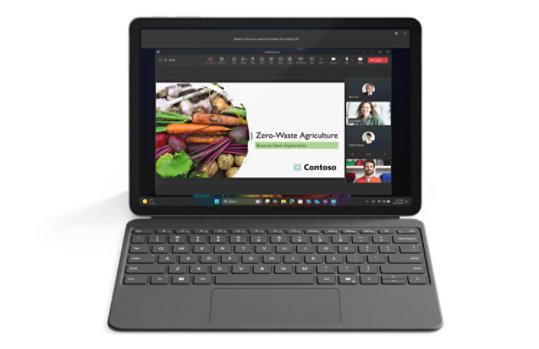
The Surface Pro 12-inch uses a high-quality PixelSense touchscreen display designed for both productivity and entertainment.
Display Highlights
| Feature | Details |
|---|---|
| Screen Size | 12-inch |
| Resolution | 2196 × 1464 |
| Refresh Rate | 90Hz |
| Aspect Ratio | 3:2 |
| Touch Support | 10-point Multi-touch |
The 3:2 aspect ratio deserves special attention because it makes the device feel significantly more natural for productivity tasks compared to standard widescreen laptops.
You see more vertical content while:
- browsing websites,
- editing documents,
- reading PDFs,
- or multitasking.
At the same time, the display still feels comfortable for movies and streaming.
Why the 3:2 Aspect Ratio Matters
Most laptops use 16:9 or 16:10 displays. While good for media consumption, they are not always ideal for productivity.
The Surface Pro’s 3:2 screen provides:
- more usable workspace,
- better document visibility,
- improved reading comfort,
- and a more tablet-friendly experience.
This makes a surprisingly large difference in day-to-day use.
Smooth 90Hz Refresh Rate
The 90Hz refresh rate improves:
- scrolling smoothness,
- animation fluidity,
- touch responsiveness,
- and overall user experience.
Compared to traditional 60Hz panels, the Surface Pro feels noticeably smoother during:
- navigation,
- web browsing,
- note-taking,
- and multitasking.
Brightness and Visual Quality
The display delivers strong brightness levels suitable for indoor and moderate outdoor usage.
Microsoft also tuned the screen for:
- crisp text clarity,
- accurate sharpness,
- and pleasant media viewing.
While the larger 13-inch Surface Pro offers an OLED option, the 12-inch IPS panel still performs very well for most users.
For:
- office work,
- movies,
- online classes,
- and general productivity,
the display quality is excellent.
Snapdragon X Plus Processor Explained
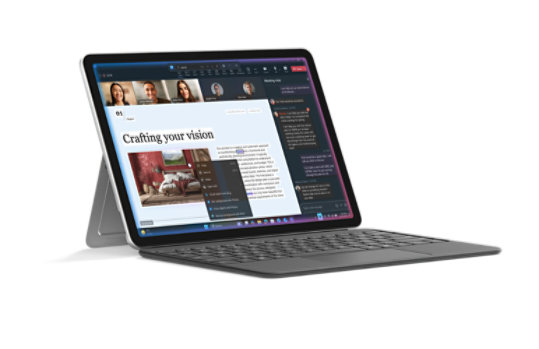
The Microsoft Surface Pro 12-inch is powered by the Snapdragon X Plus 8-core processor.
This chipset represents Microsoft and Qualcomm’s major push toward:
- AI-focused computing,
- ARM efficiency,
- silent performance,
- and ultra-long battery life.
Unlike older ARM Windows devices that struggled with compatibility and speed, the Snapdragon X Plus platform is significantly more capable.
Performance for Everyday Tasks
The Surface Pro 12-inch performs impressively well during daily workloads such as:
- Microsoft Word
- Excel
- PowerPoint
- Google Chrome
- Video streaming
- Zoom meetings
- Email management
- Web browsing
- Multitasking
- Online learning
- Media consumption
For most students, office users, remote workers, and casual creators, performance feels fast and responsive.
AI-Powered Copilot+ PC Experience
One of the biggest highlights of this generation is the introduction of Copilot+ PC features.
The Surface Pro 12-inch includes a dedicated AI engine capable of delivering up to 45 trillion operations per second (TOPS).
This allows advanced AI-powered experiences directly on the device.
AI Features Include
- Smart productivity assistance
- AI-enhanced workflows
- Real-time assistance
- Writing support
- Summarization tools
- Creative AI features
- AI image tools
- Advanced Windows AI experiences
Microsoft is clearly positioning Surface devices as the future of AI-powered Windows computing.
Fanless Design Means Silent Operation
Unlike many laptops that become noisy under load, the Surface Pro 12-inch uses a fanless cooling system.
That means:
- no loud fans,
- quieter operation,
- less heat noise,
- and a cleaner experience.
For students in classrooms, professionals in meetings, or users working at night, silent operation becomes a major advantage.

Battery Life Is One of the Biggest Strengths
Battery life is where the Surface Pro 12-inch truly shines.
Microsoft claims:
- up to 16 hours of local video playback,
- and up to 12 hours of active web browsing.
Real-world testing also showed extremely impressive results compared to many competing laptops.
For many users, the device can genuinely last:
- an entire workday,
- university classes,
- travel sessions,
- or long productivity periods
without needing a charger.
This is a major reason why ARM-powered Windows devices are becoming increasingly popular.
Real-World Battery Experience
Many user experiences consistently praise the battery life.
Users reported:
- all-day productivity,
- multi-day light usage,
- and dramatically better efficiency compared to traditional Intel laptops.
For travel-focused users, battery life alone may justify the Surface Pro purchase.

Excellent for Students and Professionals
The Surface Pro 12-inch fits perfectly into:
- university life,
- remote work,
- office productivity,
- hybrid work,
- business travel,
- and meetings.
Its lightweight design combined with long battery life creates a device that feels extremely practical in real daily use.
Students especially benefit from:
- note-taking,
- digital textbooks,
- portability,
- touch interaction,
- and long battery endurance.

Surface Pen Support for Creativity
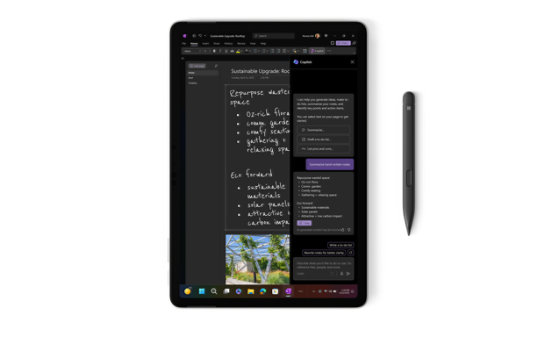
The Surface Pro 12-inch supports the Surface Slim Pen for:
- sketching,
- note-taking,
- drawing,
- annotations,
- and creative workflows.
When used in Studio Mode, the device becomes a highly portable digital workspace.
This is particularly useful for:
- designers,
- artists,
- architects,
- content creators,
- and students.
Keyboard Experience
The detachable Surface keyboard transforms the tablet into a functional laptop setup.
The keyboard offers:
- responsive typing,
- compact portability,
- premium feel,
- and touchpad support.
It works especially well for:
- emails,
- office tasks,
- writing,
- browsing,
- and productivity workflows.
However, extremely long typing sessions may still feel better on a traditional full-size laptop keyboard.
🚀 Copilot+ PC Features and AI Productivity
The Microsoft Surface Pro 12-inch is not just another Windows tablet. It belongs to Microsoft’s new generation of Copilot+ PCs, designed specifically for AI-powered workflows and future-ready computing.
This means the device is optimized for:
- AI-assisted productivity
- Faster on-device processing
- Better multitasking efficiency
- Smart content creation
- Enhanced video call experiences
- AI-powered Windows tools
Unlike cloud-only AI systems that depend heavily on internet connectivity, many Copilot+ features use the dedicated Qualcomm Hexagon NPU directly on the device.
That creates:
- lower latency,
- faster processing,
- and improved efficiency.
🧠 Understanding the 45 TOPS NPU
The Neural Processing Unit (NPU) inside the Surface Pro 12-inch delivers up to 45 TOPS (Trillion Operations Per Second).
For regular users, that translates into:
- smoother AI experiences,
- faster AI image tasks,
- real-time assistance,
- background AI processing,
- and smarter Windows features.
This dedicated AI hardware separates modern Copilot+ PCs from older laptops that rely only on CPU or GPU power.
🎯 Who Should Buy the Surface Pro 12-Inch?
The Surface Pro 12-inch is ideal for users who prioritize:
- portability,
- battery life,
- premium design,
- flexibility,
- and productivity.
Best For These Users
| User Type | Why It Works Well |
|---|---|
| Students | Lightweight, excellent battery, note-taking |
| Business Users | Portable productivity machine |
| Remote Workers | Great webcam, meetings, portability |
| Travelers | Extremely compact and easy to carry |
| Office Users | Excellent Office and multitasking performance |
| Casual Creators | Pen support and touchscreen flexibility |
| Media Consumers | Great display and speakers |
| Hybrid Workers | Laptop + tablet versatility |
❌ Who May Need a More Powerful Device?
The Surface Pro 12-inch is excellent for productivity, but it is not designed primarily for:
- heavy AAA gaming,
- advanced 4K video rendering,
- workstation-level 3D work,
- or extremely demanding creative production.
Professional creators working heavily with:
- large RAW photo batches,
- intensive Premiere Pro editing,
- Blender rendering,
- or advanced CAD workloads
may benefit more from:
- dedicated GPU laptops,
- MacBook Pro systems,
- or workstation-class devices.
However, for everyday productivity and moderate creative work, the Surface Pro performs exceptionally well.
💼 Real-World Productivity Experience
One reason users consistently praise Surface devices is because they feel practical in everyday life.
The Surface Pro 12-inch works especially well for:
- document editing,
- presentations,
- meetings,
- research,
- studying,
- and cloud workflows.
The combination of:
- touchscreen interaction,
- keyboard flexibility,
- pen support,
- and Windows software compatibility
creates an experience that feels far more adaptable than traditional laptops.
✈️ Travel Experience and Portability
Travel-friendly computing is one of the Surface Pro’s biggest advantages.
Traditional gaming laptops or performance notebooks often require:
- large chargers,
- heavy bags,
- cooling space,
- and desk-sized setups.
The Surface Pro simplifies that experience.
Why Travelers Love It
- Thin and lightweight
- Fits easily in backpacks
- Minimal desk space required
- Long battery life
- Quiet operation
- Great for flights and meetings
- Easy to use in tight spaces
For professionals constantly moving between locations, this matters enormously.
🎨 Surface Slim Pen Experience
The Surface Slim Pen significantly enhances the experience for:
- digital artists,
- students,
- note-takers,
- and creative users.
Popular Use Cases
| Use Case | Benefit |
|---|---|
| Note-taking | Natural handwriting |
| Drawing | Pressure-sensitive input |
| PDF annotation | Quick edits and notes |
| Brainstorming | Flexible sketch workspace |
| Design concepts | Portable creative setup |
When placed in Studio Mode, the Surface Pro becomes a surprisingly capable portable canvas.
🔥 Performance Expectations in Daily Use
For general users, the Surface Pro feels:
- fast,
- smooth,
- responsive,
- and modern.
Applications launch quickly, multitasking remains fluid, and the optimized ARM architecture helps maintain battery efficiency.
Excellent For:
- Chrome browsing
- Microsoft 365
- YouTube
- Netflix
- Zoom
- Teams
- Online learning
- PDFs
- Email workflows
- Streaming
⚡ Windows on ARM Has Improved Dramatically
Older ARM-based Windows devices often struggled with:
- app compatibility,
- sluggish performance,
- and software limitations.
The latest Snapdragon X Plus platform is significantly better.
Microsoft’s Prism emulation technology allows many traditional Windows applications to run far more smoothly than previous generations.
For most users, compatibility issues are now dramatically reduced compared to earlier ARM Windows devices.
🖥️ Display Experience for Entertainment
The 12-inch PixelSense display performs beautifully for entertainment purposes.
Excellent for:
- Netflix
- YouTube
- Disney+
- Movies
- Reading
- Browsing
- Social media
- Streaming
The combination of:
- sharp resolution,
- vibrant visuals,
- touchscreen responsiveness,
- and smooth 90Hz refresh rate
creates a premium viewing experience.
🔊 Speaker Quality and Multimedia
The Surface Pro also delivers strong multimedia performance.
Users commonly praise:
- balanced speakers,
- clear audio,
- and enjoyable media playback.
For casual entertainment and video streaming, the audio quality is more than sufficient for most users.
📚 A Great Device for Students in Pakistan
For Pakistani students, the Surface Pro 12-inch can function as:
- a university companion,
- digital notebook,
- presentation machine,
- research device,
- and entertainment tablet.
Student Advantages
✅ Long battery life
✅ Lightweight for campus use
✅ Excellent for online classes
✅ Microsoft Office support
✅ Great webcam for meetings
✅ Touchscreen flexibility
✅ Surface Pen compatibility
Students studying:
- business,
- medicine,
- engineering,
- media sciences,
- architecture,
- or IT
can all benefit from the flexibility of the Surface ecosystem.
🏢 Business and Office Advantages
Professionals increasingly prefer compact premium devices over bulky laptops.
The Surface Pro fits modern workflows perfectly because it:
- starts quickly,
- travels easily,
- works well in meetings,
- and handles productivity tasks efficiently.
Business users especially appreciate:
- the premium build quality,
- elegant appearance,
- and professional design language.
🔋 Why Battery Life Matters So Much
Battery life affects the real experience of a device more than most benchmark numbers.
A powerful laptop becomes frustrating if:
- it constantly needs charging,
- overheats,
- or drains rapidly during travel.
The Surface Pro 12-inch solves this problem extremely well.
Real Advantages of Long Battery Life
| Situation | Benefit |
|---|---|
| University Classes | No charger anxiety |
| Office Meetings | All-day productivity |
| Travel | Fewer charging stops |
| Remote Work | Cleaner desk setup |
| Entertainment | Longer streaming sessions |
For many users, this alone makes the Surface Pro worth considering.
🌡️ Heat and Cooling Performance
The fanless architecture helps maintain silent operation, but it also means the device behaves differently under heavier workloads.
During standard productivity usage:
- temperatures remain controlled,
- and the device stays comfortable.
Under extremely demanding workloads:
- heat can increase noticeably,
- especially during sustained heavy processing tasks.
This is common in compact fanless systems and should be understood before purchase.
🛡️ Build Quality Compared to Competitors
One area where Microsoft consistently performs well is hardware quality.
Compared to many cheaper convertibles, the Surface Pro offers:
- stronger materials,
- better finishing,
- improved rigidity,
- and premium construction.
This is one reason many Surface owners continue upgrading within the Surface ecosystem instead of switching brands.
⚖️ Surface Pro vs Traditional Laptops
The Surface Pro 12-inch is designed differently from standard laptops.
Traditional Laptop Strengths
- Larger keyboards
- More ports
- Better gaming capability
- Easier upgrades
- Higher raw power options
Surface Pro Strengths
- Better portability
- Tablet functionality
- Touchscreen flexibility
- Better travel convenience
- Lighter design
- Pen support
- Silent operation
The best choice depends on how you actually use your device daily.
🆚 Surface Pro 12-Inch vs MacBook Air
This comparison is becoming increasingly common.
Surface Pro Advantages
| Feature | Surface Pro Benefit |
|---|---|
| Touchscreen | Full touch support |
| Tablet Mode | True 2-in-1 flexibility |
| Pen Support | Excellent for notes/art |
| Windows Compatibility | Better for Windows users |
| Kickstand Design | More flexible viewing angles |
MacBook Air Advantages
| Feature | MacBook Benefit |
|---|---|
| App Optimization | Excellent Apple ecosystem |
| Creative Software | Strong media workflows |
| Raw Efficiency | Excellent optimization |
| Battery | Also industry-leading |
For users deeply tied to Windows workflows, the Surface Pro remains a highly attractive option.
🎮 Can You Game on the Surface Pro?
Light gaming is possible, but this is not a gaming-focused machine.
Good For:
- casual gaming,
- cloud gaming,
- indie titles,
- older games,
- and lighter experiences.
Not Ideal For:
- high-end AAA gaming,
- competitive esports,
- or GPU-intensive modern titles.
Users wanting serious gaming performance should consider dedicated gaming laptops instead.
📸 Webcam and Video Calling Experience
Remote work and online communication are now essential parts of daily life.
The Surface Pro includes a high-quality front camera suitable for:
- Zoom,
- Teams,
- Google Meet,
- online teaching,
- and professional meetings.
The portability combined with camera quality makes it especially useful for hybrid workers and students.
🌐 Connectivity Experience
The device supports modern wireless standards and provides stable connectivity for:
- browsing,
- streaming,
- cloud workflows,
- and remote collaboration.
The dual USB-C setup also allows:
- monitor connections,
- docking stations,
- fast data transfers,
- and modern accessory support.
🛒 Why Buy Microsoft Surface Pro 12-Inch from Typeshop.pk?
Buying premium electronics in Pakistan requires trust.
Many online marketplaces:
- mix unofficial imports,
- unclear warranties,
- refurbished units,
- or unreliable sellers.
That creates risk for buyers spending premium amounts.
Typeshop.pk positions itself differently by focusing on:
- premium products,
- customer trust,
- authentic devices,
- and a more professional buying experience.
Advantages of Buying from Typeshop.pk
✅ Trusted premium store experience
✅ Authentic premium devices
✅ Better confidence for Pakistani buyers
✅ Competitive local pricing
✅ Safer purchasing process
✅ Easier communication and support
✅ Reliable customer experience
💰 Is the Microsoft Surface Pro 12-Inch Worth ₨ 399,999?
At first glance, the price may appear premium.
However, the Surface Pro is competing in the high-end ultrabook and premium 2-in-1 category, not the budget laptop segment.
When evaluating the price, buyers should consider:
- premium construction,
- AI hardware,
- portability,
- battery life,
- touchscreen flexibility,
- and long-term usability.
For users who truly value mobility and premium computing, the experience can absolutely justify the investment.
⚠️ Things to Consider Before Buying
No device is perfect, and the Microsoft Surface Pro 12-inch also has a few limitations buyers should know before purchasing.
Potential Drawbacks
| Limitation | Details |
|---|---|
| Keyboard Sold Separately | Adds extra cost |
| Limited Ports | Only dual USB-C ports |
| No Dedicated GPU | Not ideal for heavy gaming |
| ARM Compatibility | Rare software limitations may still exist |
| Premium Price | Expensive compared to budget laptops |
| No Included Charger in Some Regions | Users may need separate adapter |
For most productivity-focused users, these limitations are manageable, but understanding them helps buyers make informed decisions.
🔍 Microsoft Surface Pro 12-Inch vs Other 2-in-1 Devices
The premium 2-in-1 category includes several competitors, but the Surface Pro still maintains a strong identity.
Compared to Standard Convertibles
Most cheaper convertibles:
- feel heavier,
- have weaker battery life,
- use lower-quality materials,
- and lack true tablet comfort.
The Surface Pro delivers a more refined premium experience.
Compared to Android Tablets
Android tablets are excellent for media consumption but often struggle with:
- desktop-level productivity,
- advanced Windows software,
- multitasking,
- and professional workflows.
The Surface Pro functions as a real Windows computer, which gives it a major advantage for professional users.
Compared to iPads
iPads offer incredible app optimization and performance, but:
- Windows software compatibility,
- desktop-style workflows,
- and multitasking flexibility
still make the Surface Pro extremely appealing for many users.
🛍️ Buying Guide – How to Choose the Right Surface Pro Configuration
Before buying, users should understand which configuration fits their needs best.
256GB Model Best For:
- Students
- Office users
- Casual productivity
- Web browsing
- Streaming
- Online learning
512GB Model Best For:
- Professionals
- Heavy multitaskers
- Large file storage
- Creative workflows
- Business users
💡 Should You Buy the Surface Keyboard and Slim Pen?
The answer depends on your workflow.
Buy the Keyboard If You:
✅ Type regularly
✅ Use Office apps
✅ Work professionally
✅ Need laptop functionality
✅ Write assignments or emails
Buy the Slim Pen If You:
✅ Take handwritten notes
✅ Draw or sketch
✅ Annotate PDFs
✅ Work creatively
✅ Prefer touch interaction
Most users get the best Surface experience when using both accessories together.
📈 Why Surface Devices Hold Their Value
Premium Surface devices often maintain stronger long-term value compared to cheaper Windows laptops because:
- build quality remains strong,
- performance ages better,
- and the design stays modern longer.
This makes the Surface lineup appealing even from a long-term ownership perspective.
🌍 Microsoft Surface Pro 12-Inch in Pakistan
The Pakistani market increasingly demands:
- premium portability,
- battery efficiency,
- hybrid work solutions,
- and high-quality computing devices.
The Surface Pro fits perfectly into these modern usage patterns.
Professionals, students, freelancers, content creators, and remote workers in Pakistan are increasingly choosing compact premium machines instead of bulky laptops.
🧾 Microsoft Surface Pro 12-Inch – Quick Summary Table
| Category | Highlights |
|---|---|
| Design | Premium ultra-light 2-in-1 |
| Performance | Fast for productivity |
| Battery | Up to 16 hours |
| Display | Sharp 12-inch PixelSense |
| AI Features | Copilot+ PC with 45 TOPS |
| Portability | Excellent |
| Gaming | Limited |
| Creative Work | Moderate-level capable |
| Best Use | Productivity & portability |
| Build Quality | Premium |
| Operating System | Windows 11 |
| Cooling | Fanless and silent |
💻 Microsoft Surface Pro 12 Inch Price in Pakistan – Is It Worth Buying?
The Microsoft Surface Pro 12 inch price in Pakistan places it in the premium category, but the device delivers a modern experience that combines portability, AI-powered productivity, and flexible 2-in-1 functionality. Users searching for the Surface Pro 12 price in Pakistan are usually looking for a lightweight premium Windows device that can handle work, study, entertainment, and travel without the bulk of traditional laptops. Compared to many standard ultrabooks, the Microsoft Surface lineup focuses heavily on portability and long battery life, which makes it highly attractive for modern hybrid workflows.
🚀 Microsoft Surface Pro 12 Review – Real Productivity Experience
This Microsoft Surface Pro 12 review shows why the device is becoming increasingly popular among students, professionals, freelancers, and remote workers. The combination of a high-resolution PixelSense touchscreen, Snapdragon X Plus processor, Copilot+ AI features, and silent fanless operation creates a smooth user experience for everyday tasks. Unlike many bulky laptops, the Microsoft Surface Pro 12 inch feels extremely portable while still offering full Windows functionality. Users who value mobility and premium build quality often prefer the Surface ecosystem over regular laptops.
📋 Microsoft Surface Pro 12 Specs and Performance
The Microsoft Surface Pro 12 specs include a 12-inch PixelSense touchscreen display, Snapdragon X Plus 8-core processor, 16GB RAM, SSD storage options, dual USB-C ports, and advanced AI hardware with a dedicated NPU. These specifications make the Surface Pro highly suitable for:
- office productivity,
- online classes,
- content consumption,
- multitasking,
- note-taking,
- and business workflows.
For users researching the Microsoft Surface Pro price in Pakistan, understanding these premium specifications helps explain why the device sits above budget Windows convertibles in terms of quality and performance.
🌍 Why Surface Pro 12 Pakistan Searches Are Increasing
Search interest for Surface Pro 12 Pakistan has increased significantly because users now want more portable and flexible computing devices. Many Pakistani buyers are moving away from heavy traditional laptops and looking for lightweight premium systems with excellent battery life. The Surface Pro 12-inch fits perfectly into this trend by offering tablet flexibility alongside full desktop-class Windows productivity. Its premium design, touchscreen support, and AI-focused architecture make it one of the most future-ready Windows devices currently available in Pakistan.
🛒 Where to Buy Microsoft Surface Pro 12 Inch in Pakistan
When searching for the Microsoft Surface Pro 12 inch price in Pakistan, buyers should always choose reliable stores that focus on authentic premium devices. Purchasing from trusted platforms like Typeshop.pk gives users greater confidence regarding originality, customer support, and safer purchasing compared to random marketplace listings. Since premium devices require long-term reliability, buying from a trusted Pakistani tech store becomes an important advantage for professional users and students alike.
⭐ Surface Pro 12 Review – Final Buying Perspective
This Surface Pro 12 review proves that Microsoft successfully created a premium 2-in-1 device focused on portability, battery efficiency, and AI-powered productivity rather than pure gaming performance. Users comparing the Surface Pro 12 price in Pakistan with other premium laptops should consider the unique advantages the Surface lineup offers, including:
- touchscreen flexibility,
- Surface Pen compatibility,
- lightweight design,
- silent fanless operation,
- and strong all-day battery life.
For productivity-focused users, the Microsoft Surface Pro remains one of the strongest premium Windows devices currently available.
Frequently asked Questions
❓ What is the Microsoft Surface Pro 12-inch price in Pakistan?
The Surface Pro 12 price in Pakistan price in Pakistan is ₨ 399,999 at Typeshop.pk.
❓ Is the Microsoft Surface Pro 12-inch available in Pakistan?
Yes, the Microsoft Surface Pro 12-inch is available in Pakistan through premium tech retailers like Typeshop.pk.
❓ Is the Surface Pro 12-inch a laptop or tablet?
It is a 2-in-1 device that works as both a tablet and a laptop.
❓ Does the Surface Pro 12-inch come with a keyboard?
In many cases, the keyboard is sold separately.
❓ Does the Surface Pro support a stylus pen?
Yes, it supports the Surface Slim Pen.
❓ Is the Surface Pro 12-inch good for students?
Yes, it is excellent for students because of its portability, battery life, and note-taking features.
❓ Can the Surface Pro run Microsoft Office?
Yes, it runs Microsoft Office applications smoothly.
❓ Is the Surface Pro good for online classes?
Yes, it works very well for Zoom, Teams, Google Meet, and online learning.
❓ Does the Surface Pro support multitasking?
Yes, the 16GB RAM configuration handles multitasking efficiently.
❓ Is the Surface Pro good for programming?
Yes, it is suitable for coding, development, and web programming tasks.
❓ Can the Surface Pro replace a laptop?
For many users, yes. It can fully replace a traditional productivity laptop.
❓ Is the Surface Pro lightweight?
Yes, it is one of the lightest premium Windows devices available.
❓ How much battery life does the Surface Pro 12-inch offer?
Microsoft claims up to 16 hours depending on usage.
❓ Is the Surface Pro good for travel?
Yes, portability is one of its biggest strengths.
❓ Does the Surface Pro overheat?
Under normal usage it remains controlled, though heavy workloads may increase heat.
❓ Is the Surface Pro fanless?
Yes, it uses a fanless cooling design.
❓ Does the Surface Pro make noise?
No, silent operation is one of its advantages.
❓ Is the Surface Pro touchscreen?
Yes, it has a PixelSense touchscreen display.
❓ What processor does the Surface Pro 12-inch use?
It uses the Snapdragon X Plus 8-core processor.
❓ What is Copilot+ PC?
Copilot+ PCs are AI-focused Windows computers with dedicated NPU hardware.
❓ What does 45 TOPS mean?
It refers to AI processing capability measured in trillion operations per second.
❓ Is the Surface Pro good for AI tasks?
Yes, it is optimized for modern AI-powered workflows.
❓ Can the Surface Pro run Windows 11?
Yes, it comes with Windows 11.
❓ Is the Surface Pro good for watching movies?
Yes, the display and speakers make it excellent for media consumption.
❓ Does the Surface Pro support Netflix and YouTube?
Yes, both work smoothly.
❓ Is the Surface Pro good for office work?
Yes, it is excellent for office productivity.
❓ Is the Surface Pro good for remote work?
Yes, especially due to its portability and webcam quality.
❓ Can the Surface Pro handle Zoom meetings?
Yes, very efficiently.
❓ Does the Surface Pro support Bluetooth?
Yes, it supports Bluetooth connectivity.
❓ Does the Surface Pro support Wi-Fi?
Yes, it includes modern wireless connectivity.
❓ How many USB ports does the Surface Pro have?
It includes two USB-C ports.
❓ Does the Surface Pro have HDMI?
No, HDMI requires an adapter.
❓ Does the Surface Pro have USB-A?
No, it mainly uses USB-C connectivity.
❓ Is the Surface Pro good for business users?
Yes, many professionals prefer it for productivity and portability.
❓ Is the Surface Pro durable?
Yes, it has premium build quality.
❓ Does the Surface Pro support drawing?
Yes, especially with the Surface Slim Pen.
❓ Is the Surface Pro good for digital artists?
It is suitable for moderate creative workflows and sketching.
❓ Can the Surface Pro edit photos?
Yes, though extremely heavy RAW workflows may be slower.
❓ Can the Surface Pro edit videos?
Yes, light-to-moderate editing is possible.
❓ Is the Surface Pro good for gaming?
It supports light gaming but is not a gaming-focused device.
❓ Can the Surface Pro run PC games?
Some PC games work, especially lighter titles.
❓ Is the Surface Pro better than a regular laptop?
For portability and flexibility, many users think so.
❓ Does the Surface Pro support external monitors?
Yes, through USB-C connections.
❓ Can the Surface Pro be used as a desktop replacement?
For productivity users, yes.
❓ Is the Surface Pro good for presentations?
Yes, it works excellently for presentations and meetings.
❓ Is the Surface Pro comfortable for typing?
Yes, especially with the official keyboard.
❓ Is the Surface Pro good for reading PDFs?
Yes, the 3:2 display ratio helps significantly.
❓ Does the Surface Pro support touch gestures?
Yes, Windows touch gestures work smoothly.
❓ Is the Surface Pro suitable for medical students?
Yes, many medical students prefer portable touchscreen devices.
❓ Is the Surface Pro good for engineering students?
Yes, for general productivity and academic workflows.
❓ Is the Surface Pro good for freelancers?
Yes, especially remote professionals and consultants.
❓ Is the Surface Pro easy to carry?
Yes, portability is one of its main selling points.
❓ Does the Surface Pro have good speakers?
Yes, the audio quality is balanced and clear.
❓ Is the Surface Pro suitable for daily use?
Yes, it is designed specifically for daily productivity.
❓ Is the Surface Pro premium?
Yes, it is considered a premium Windows device.
❓ Does the Surface Pro support cloud workflows?
Yes, it works well with cloud services and online platforms.
❓ Can the Surface Pro run Chrome smoothly?
Yes, web browsing performance is excellent.
❓ Does the Surface Pro support multitouch?
Yes, it supports multi-touch functionality.
❓ Is the Surface Pro future-proof?
Its AI-focused hardware helps it remain modern longer.
❓ Is the Surface Pro suitable for hybrid work?
Yes, it is ideal for hybrid workflows.
❓ Can the Surface Pro be used without a keyboard?
Yes, fully as a tablet.
❓ Is the Surface Pro comfortable for note-taking?
Yes, especially with the Surface Pen.
❓ Does the Surface Pro support handwriting?
Yes, handwriting support is excellent.
❓ Is the Surface Pro good for content creators?
Yes, moderate-level content creation works well.
❓ Does the Surface Pro support external keyboards?
Yes, Bluetooth and USB-C keyboards work.
❓ Is the Surface Pro good for streaming?
Yes, streaming quality is excellent.
❓ Does the Surface Pro support Teams meetings?
Yes, perfectly.
❓ Can the Surface Pro run Excel efficiently?
Yes, productivity performance is excellent.
❓ Is the Surface Pro suitable for entrepreneurs?
Yes, many business owners value its portability.
❓ Is the Surface Pro good for home use?
Yes, it works very well for entertainment and productivity.
❓ Can the Surface Pro handle multiple tabs?
Yes, multitasking performance is strong.
❓ Is the Surface Pro suitable for writers?
Yes, it is excellent for writing workflows.
❓ Does the Surface Pro support Adobe apps?
Yes, though heavy creative workloads vary.
❓ Is the Surface Pro suitable for meetings?
Yes, especially because of its compact design.
❓ Can the Surface Pro connect to docking stations?
Yes, via USB-C.
❓ Is the Surface Pro stylish?
Yes, its design is considered modern and premium.
❓ Is the Surface Pro available in multiple colors?
Yes, including Platinum, Ocean, and Violet.
❓ Does the Surface Pro support wireless accessories?
Yes, Bluetooth accessories work well.
❓ Can the Surface Pro be used for online business?
Yes, it is excellent for remote business workflows.
❓ Is the Surface Pro good for web browsing?
Yes, browsing feels smooth and responsive.
❓ Does the Surface Pro support OneNote?
Yes, especially useful with the Surface Pen.
❓ Is the Surface Pro a good investment?
For users needing premium portability and productivity, yes.
❓ Is the Surface Pro expensive?
It is positioned in the premium category.
❓ Does the Surface Pro feel premium in hand?
Yes, build quality is one of its biggest strengths.
❓ Is the Surface Pro better than cheap Windows tablets?
Yes, significantly better in quality and performance.
❓ Can the Surface Pro be used professionally?
Absolutely.
❓ Is the Surface Pro suitable for executives?
Yes, many professionals prefer it for business travel.
❓ Does the Surface Pro support cloud storage services?
Yes, including OneDrive, Google Drive, and Dropbox.
❓ Can the Surface Pro handle emails and office tasks?
Yes, extremely well.
❓ Is the Surface Pro easy to use?
Yes, especially for Windows users.
❓ Does the Surface Pro support external storage?
Yes, through USB-C accessories.
❓ Is the Surface Pro suitable for media consumption?
Yes, movies and streaming look excellent.
❓ Is the Surface Pro ideal for hybrid lifestyles?
Yes, that is one of its core strengths.
❓ Does the Surface Pro support productivity apps?
Yes, including Microsoft 365 and many professional tools.
❓ Is the Surface Pro good for modern workflows?
Yes, especially AI-powered and hybrid workflows.
❓ Is the Surface Pro good for professionals in Pakistan?
Yes, especially users who value portability and premium quality.
❓ Why buy the Surface Pro from Typeshop.pk?
Because Typeshop.pk provides a more trusted and premium buying experience for Pakistani customers looking for authentic high-end devices.
⭐ Final Verdict – Should You Buy the Microsoft Surface Pro 12-Inch?
The Microsoft Surface Pro 12-inch is one of the most refined premium Windows 2-in-1 devices currently available in Pakistan.
Instead of chasing raw gaming performance or workstation-level power, Microsoft focused on what modern users actually value most:
- portability,
- battery life,
- flexibility,
- premium build quality,
- AI-powered productivity,
- and real-world convenience.
The result is a device that feels exceptionally modern and practical.
For:
- students,
- business professionals,
- remote workers,
- freelancers,
- travelers,
- and productivity-focused users,
the Surface Pro 12-inch delivers an experience that few Windows devices can match in this size category.
Its:
- lightweight design,
- stunning PixelSense touchscreen,
- fanless silent operation,
- strong battery life,
- Copilot+ AI features,
- and premium hardware quality
make it stand out from typical laptops and budget convertibles.
Of course, users needing:
- serious gaming performance,
- advanced 3D rendering,
- or heavy professional video production
may still prefer a more powerful dedicated workstation or gaming machine.
But for the majority of premium productivity users, the Surface Pro 12-inch hits an outstanding balance between:
- power,
- portability,
- efficiency,
- and flexibility.
At ₨ 399,999, it sits firmly in the premium category, but the overall experience, mobility, and modern AI-focused hardware help justify the investment for users wanting a future-ready Windows device.
For Pakistani buyers looking for a trusted purchasing experience, Typeshop.pk remains one of the better choices for buying premium devices like the Microsoft Surface Pro 12-inch with greater confidence, authenticity assurance, and customer trust.
Microsoft surface pro 12 inch price in Pakistan
Thanks For Visiting Typeshop
Customer Reviews
Related Products







Reviews
Clear filtersThere are no reviews yet.