Model Number: A83A9
🔋 All-in-One Charging Solution
The dock eliminates the need for multiple chargers:
-
🔌 100W charging for laptops
-
🔋 30W charging via USB-C ports
-
⚡ Power multiple devices simultaneously
Charge your laptop, smartphone, tablet, and accessories from a single hub.
🛡️ Built-In Security & Smart Management
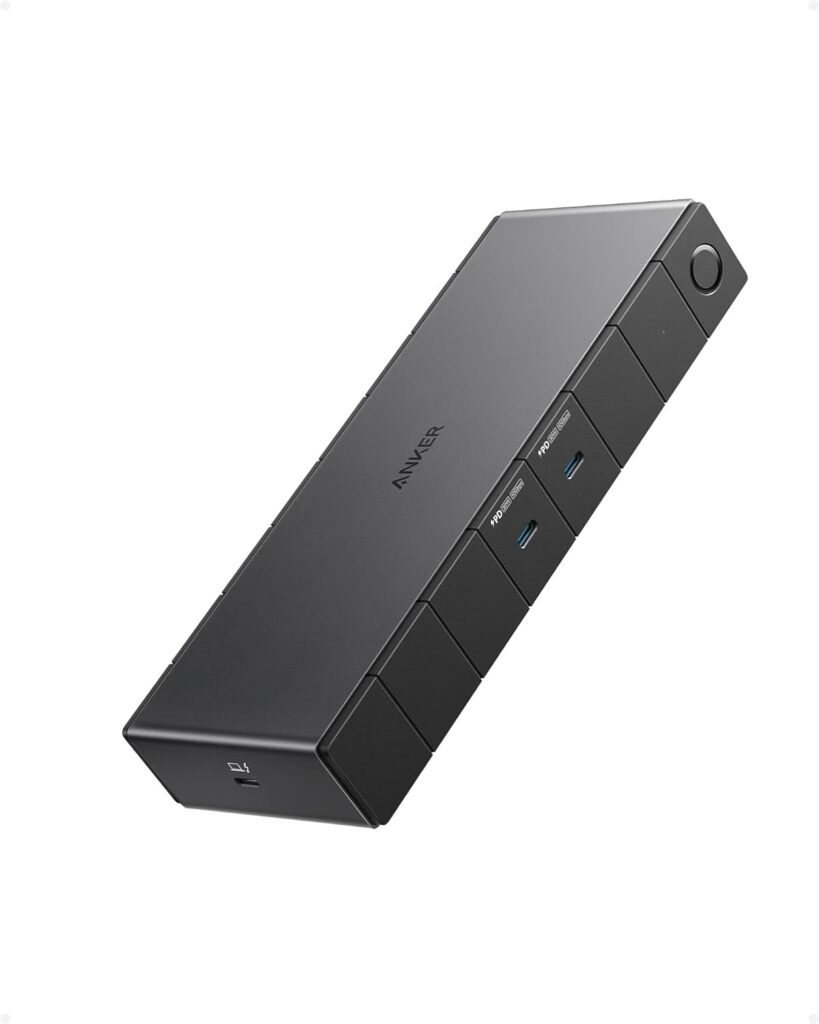
🔐 Kensington NanoSaver Slot
Secure your docking station with a compatible lock — ideal for offices and shared environments.
📱 Anker Dock Manager App
-
Firmware updates
-
Troubleshooting
-
Performance monitoring
📦 What’s in the Box?
When you purchase the Anker 778 Docking Station, you get:
-
✔ Anker 778 Thunderbolt Dock (12-in-1)
-
✔ 180W Power Adapter
-
✔ 0.7m Thunderbolt 4 Cable
-
✔ Welcome Guide
-
✔ 18-Month Warranty
-
✔ Friendly Customer Support
💼 Who Should Buy the Anker 778 Dock?
This docking station is perfect for:
👨💻 Professionals
-
Developers
-
Video editors
-
Designers
-
Engineers
🎮 Gamers & Streamers
-
Multi-monitor setups
-
High-speed peripherals
🏢 Office Users
-
Clean desk setup
-
Secure docking
-
Reliable connectivity
🆚 Anker 778 vs Traditional USB-C Hubs
| Feature |
Anker 778 |
Basic USB-C Hub |
| Bandwidth |
40 Gbps |
5–10 Gbps |
| Charging |
100W |
45–60W |
| Displays |
Up to 4 |
1–2 |
| Ethernet |
Yes |
Limited |
| Future Proof |
Yes |
No |
🔍 Compatibility Guide
✅ Supported Devices
❌ Not Supported
-
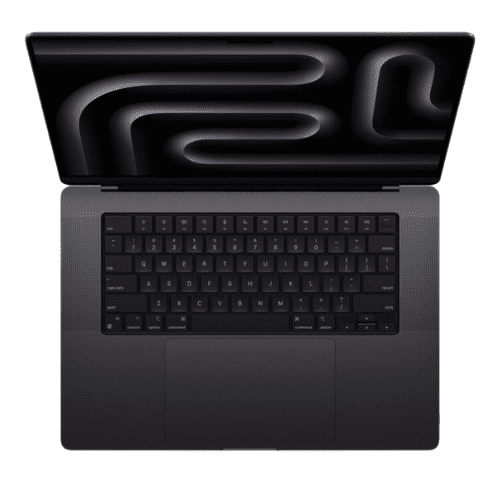
M1/M2 MacBooks
-
Asus AMD CPU laptops
🌟 Benefits of Using a Thunderbolt Dock
🛒 Why Buy from Typeshop.pk?
✔ Genuine Anker products
✔ Competitive price in Pakistan
✔ Cash on Delivery available
✔ Fast nationwide shipping
✔ Reliable customer support
🔧 Use Cases in Pakistan
The Anker 778 Dock is ideal for:
-
Software houses in Lahore & Karachi
-
Freelancers working from home
-
YouTubers & content creators
-
Corporate offices
-
Online teachers & students
⚙️ Advanced Performance Insights of the Anker 778 Thunderbolt Dock
The Anker 778 Thunderbolt Docking Station is not just a connectivity hub — it’s a performance accelerator for modern workflows. With Thunderbolt 4 architecture, it enables simultaneous high-bandwidth tasks without bottlenecks.
🚀 Real-World Performance Scenarios
-
Transfer 100GB files in minutes
-
Run multiple 4K monitors without lag
-
Edit 8K video directly from external SSDs
-
Maintain stable Ethernet during heavy uploads
Unlike standard docks, the Anker 778 maintains consistent throughput even when all ports are in use.
🧠 How Thunderbolt 4 Enhances Productivity
Thunderbolt 4 is designed for reliability and uniform performance standards. This ensures every certified device delivers:
-
🔄 Consistent 40 Gbps bandwidth
-
🔌 Universal USB-C compatibility
-
🖥️ Guaranteed dual 4K display support
-
⚡ Secure DMA protection
This consistency eliminates compatibility guesswork and improves workplace efficiency.
🏢 Enterprise & Office Deployment Benefits
For businesses in Pakistan adopting hybrid work models, the Anker 778 offers scalable deployment.
🏬 Benefits for Corporate Environments
-
Standardized desk setups
-
Reduced IT support requests
-
Secure physical locking (Kensington slot)
-
Centralized charging solution
-
Clean cable management
IT teams can deploy identical docking setups across departments, simplifying maintenance.
🎬 Optimized for Content Creators & Media Professionals
🎥 Video Editing Workflows
Content creators working with Premiere Pro, DaVinci Resolve, or Final Cut benefit from:
-
Real-time playback of high-resolution footage
-
Fast external drive access
-
Multi-monitor timelines and previews
📸 Photography & Tethered Shooting
Photographers can tether cameras directly to laptops while:
-
Backing up images to external SSDs
-
Previewing shots on large monitors
-
Charging accessories simultaneously
🎧 Audio Production & Podcasting Setup
The dock enables professional audio workflows:
-
Connect USB audio interfaces
-
Power condenser microphones via interface
-
Monitor audio on external speakers
-
Transfer large audio libraries quickly
Low latency and stable bandwidth are essential for recording and live monitoring.
🧪 Ideal for Software Developers & Engineers
Developers often run multiple environments simultaneously. The Anker 778 supports:
-
Virtual machines
-
Containerized environments
-
External GPU workflows (compatible systems)
-
Multiple displays for coding, debugging, and documentation
This improves multitasking and reduces context switching.
🌐 Network Stability for Remote Work & Freelancers
Remote workers rely on stable internet for meetings and uploads. The Gigabit Ethernet port provides:
-
Lower latency than Wi-Fi
-
Stable video calls
-
Faster cloud backups
-
Reliable VPN connections
For freelancers in Pakistan, this means fewer disruptions during client meetings.
🧵 Cable Management & Desk Aesthetics
A clutter-free desk improves focus and productivity.
✨ Desk Transformation Benefits
Minimalist setups also enhance video call professionalism.
🌡️ Thermal Design & Heat Management
High-performance docks generate heat, but the Anker 778 features:
This ensures safe operation during long work sessions.
🔐 Data Security & Hardware Protection
Security is crucial in shared workspaces.
🛡️ Built-in Security Features
-
Kensington NanoSaver lock support
-
Secure firmware updates via Dock Manager
-
DMA protection via Thunderbolt 4
These features help protect sensitive corporate and personal data.
📚 Educational & Training Lab Applications
Schools and training centers can benefit from standardized docking stations.
🎓 Benefits for Education
-
Quick laptop connectivity for students
-
Multi-display teaching setups
-
Reliable wired internet for exams
-
Reduced wear on laptop ports
This is especially useful in computer labs and training institutes.
🏠 Smart Home Office Integration
With remote work becoming permanent, the Anker 778 helps build a smart home office.
🪑 Home Office Advantages
-
Seamless switch between work & personal devices
-
Connect printers, webcams, and storage
-
Power entire workstation from one dock
This simplifies daily workflow transitions.
🎮 Streaming & Multi-Platform Content Creation
Streamers can connect multiple devices:
Stable bandwidth ensures smooth live streaming without frame drops.
🔄 Future-Proof Investment Value
Technology evolves quickly, but Thunderbolt 4 ensures longevity.
📈 Why It’s Future-Ready
-
Supports next-gen laptops
-
Backward compatibility with Thunderbolt 3 & USB-C
-
Ready for higher-resolution displays
-
Handles increasing file sizes
This makes it a long-term investment rather than a short-term accessory.
🧭 Step-by-Step Setup Guide
🛠️ Quick Installation
-
Connect power adapter to dock.
-
Attach Thunderbolt 4 cable to laptop.
-
Connect monitors and peripherals.
-
Install optional Dock Manager software.
-
Enjoy instant expansion.
No drivers are required for most systems.
🔧 Troubleshooting Common Issues
⚠️ No Display Output
⚠️ Slow Data Transfer
⚠️ Charging Not Working
📊 ROI (Return on Investment) for Professionals
Although premium priced, the dock saves money long-term.
💼 Cost-Saving Benefits
-
Eliminates need for multiple adapters
-
Reduces laptop port damage
-
Improves productivity (time savings)
-
Extends laptop usability
Time saved in workflow efficiency often outweighs initial cost.
🌍 Sustainability & Eco-Friendly Benefits
Using one docking station instead of multiple adapters reduces electronic waste.
♻️ Environmental Advantages
This supports greener tech practices.
🧩 Integration with External Storage & NAS Systems
Professionals working with large datasets benefit from:
This is ideal for video archives, research data, and enterprise storage.
🧑💻 Ergonomic Benefits of Multi-Display Setups
Using multiple monitors improves posture and productivity.
🪑 Ergonomic Improvements
The Anker 778 enables ergonomic workstation design.
🧮 Performance for Financial & Data Analysts
Analysts working with large datasets benefit from:
-
Multi-screen spreadsheets
-
Real-time data visualization
-
Fast database transfers
-
Stable internet for cloud analytics
This improves decision-making speed.
🧰 Ideal for Repair Technicians & IT Professionals
IT professionals can use the dock for:
It becomes a versatile diagnostic tool.
🎯 Why Professionals Prefer Premium Docks
Premium docks like the Anker 778 offer:
Cheap hubs often fail under heavy workloads.
🛍️ Buying Considerations Before Purchase
Before buying, consider:
This ensures you fully utilize the dock’s capabilities.
🔮 The Future of Docking Stations
Docking stations are evolving into central computing hubs.
🔭 Emerging Trends
-
Higher display resolutions (10K+)
-
Faster storage interfaces
-
AI-optimized workflows
-
Universal connectivity standards
The Anker 778 positions users ahead of these trends.
🏁 Final Thoughts
The Anker 778 Thunderbolt Docking Station is more than a port expander — it is a productivity engine designed for modern professionals, creators, and businesses. With future-ready technology, enterprise-grade reliability, and unmatched versatility, it transforms any workspace into a high-performance command center.
🧬 Deep Dive into Thunderbolt 4 Architecture & Data Flow
The Anker 778 Thunderbolt Docking Station leverages Thunderbolt 4’s advanced architecture to manage simultaneous data, video, and power streams without congestion.
🔍 How Data Flows Through the Dock
Thunderbolt 4 uses intelligent bandwidth allocation to ensure:
-
Smooth video output even during large file transfers
-
No slowdown when multiple USB devices are active
-
Stable Ethernet performance during heavy uploads
This dynamic bandwidth management makes the dock ideal for multitasking-heavy environments.
🖥️ Workstation Transformation for Power Users
The dock transforms an ordinary laptop into a full desktop-class workstation.
💻 What Changes After Using the Dock?
-
Single cable connects entire setup
-
Instant access to peripherals
-
Desktop-level productivity
-
Seamless device switching
This transformation is especially valuable for users transitioning between office and home setups.
🧑🎨 Graphic Design & 3D Rendering Advantages
Designers working with tools like Blender, AutoCAD, or Adobe Creative Suite benefit significantly.
🎨 Key Advantages
-
Multi-monitor canvas expansion
-
Faster asset loading from external drives
-
Smooth rendering previews
-
Stable color grading across displays
High bandwidth ensures large project files load quickly and reliably.
🛰️ Reliable Performance for Online Learning & Virtual Classrooms
Teachers and students can build efficient digital classrooms.
🎓 Benefits for E-Learning
-
Connect webcams, microphones, and projectors
-
Use multiple displays for presentations
-
Maintain stable internet via Ethernet
-
Record lectures directly to external drives
This setup enhances both teaching quality and learning engagement.
🧭 Travel-Friendly Productivity Hub
Despite its powerful capabilities, the dock is compact enough for mobile professionals.
✈️ Benefits for Travelers
-
Replace multiple adapters with one device
-
Set up a full workstation in hotel rooms
-
Reliable wired internet where Wi-Fi is unstable
-
Portable yet powerful
This makes it ideal for consultants, trainers, and remote workers.
🧱 Build Quality & Industrial Design
The dock features premium construction designed for durability.
🏗️ Design Highlights
The robust build ensures long-term reliability even in demanding environments.
🔌 Peripheral Compatibility & Device Ecosystem
The Anker 778 supports a wide ecosystem of devices.
🔗 Compatible Peripherals
This versatility allows users to customize their workflow.
🧠 Smart Power Distribution Technology
The dock intelligently distributes power based on connected devices.
⚡ Power Management Features
-
Prioritizes laptop charging
-
Prevents overcurrent damage
-
Efficient energy allocation
-
Safe charging for sensitive devices
This protects both the dock and connected hardware.
🛠️ Maintenance & Long-Term Care Tips
To ensure optimal performance:
🧼 Maintenance Guidelines
-
Keep vents dust-free
-
Use certified Thunderbolt cables
-
Avoid overloading power outlets
-
Update firmware periodically
Proper care extends the lifespan of the docking station.
🧑💼 Productivity Gains for Remote Teams
Remote teams using standardized docks experience:
-
Faster onboarding for new employees
-
Consistent workstation setups
-
Reduced technical troubleshooting
-
Improved collaboration efficiency
Uniform hardware simplifies IT management.
🧩 Integration with Smart Office Equipment
The dock integrates with modern office tools.
🏢 Smart Office Compatibility
This supports seamless hybrid meeting environments.
🎥 Multi-Camera & Video Production Setups
Video professionals can connect multiple cameras and accessories.
📹 Production Advantages
-
Simultaneous camera feeds
-
Real-time editing workflows
-
Fast storage access for footage
-
Stable power for accessories
Perfect for YouTubers, streamers, and production teams.
🔄 Seamless Device Switching for Multi-Device Users
Users with multiple laptops can easily switch workstations.
🔁 Workflow Benefits
-
Unplug one cable to switch devices
-
Maintain peripheral connections
-
No need for reconfiguration
Ideal for shared desks and hot-desking environments.
🧮 Performance Stability Under Heavy Load
Stress testing shows the dock maintains performance even when:
-
All USB ports are in use
-
Multiple displays are active
-
Large file transfers are running
-
Ethernet is under heavy load
This reliability is crucial for mission-critical tasks.
🌐 Enhanced Cloud Workflow Efficiency
Cloud-based professionals benefit from:
-
Faster uploads via Ethernet
-
Reliable sync with cloud storage
-
Smooth remote desktop sessions
-
Stable SaaS platform usage
This is essential for modern cloud-driven businesses.
🧑🔬 Research & Laboratory Applications
Labs and research centers can use the dock for:
-
Connecting measurement instruments
-
Data logging to external storage
-
Multi-display data visualization
-
Secure wired networking
Reliable connectivity is critical in research environments.
🧵 Minimal Latency for Real-Time Applications
Low latency performance benefits:
Thunderbolt 4 ensures near-instant data transmission.
🏗️ Infrastructure Benefits for Co-Working Spaces
Co-working spaces can deploy docking stations to improve user experience.
🏢 Advantages
-
Plug-and-play desks
-
Reduced cable clutter
-
Universal compatibility
-
Premium workspace appeal
This attracts professionals seeking high-quality work environments.
🧭 Digital Nomad Workflows Made Easy
Digital nomads can maintain productivity anywhere.
🌍 Key Benefits
-
Portable workstation setup
-
Reliable connectivity in shared spaces
-
Reduced reliance on adapters
-
Professional workspace anywhere
This supports location-independent careers.
🧰 IT Asset Management & Device Longevity
Using a dock reduces wear on laptop ports.
🔧 Longevity Benefits
This lowers hardware replacement costs.
📊 Workflow Optimization for Data-Heavy Industries
Industries handling large datasets benefit from:
-
Faster data ingestion
-
Multi-screen analytics dashboards
-
Reliable backup processes
-
Improved processing workflows
This enhances operational efficiency.
🧑💻 Enhanced Developer Desk Setup Ideas
Developers can create powerful setups using:
-
Vertical monitor for code
-
Horizontal monitor for debugging
-
External SSD for builds
-
Ethernet for stable Git operations
This improves coding efficiency and reduces build times.
🎯 Strategic Investment for Growing Businesses
As teams expand, scalable hardware becomes essential.
📈 Growth Benefits
-
Standardized workstations
-
Easy scaling for new employees
-
Reduced setup time
-
Improved operational efficiency
The Anker 778 supports long-term business growth.
🏁 Closing Perspective
With its advanced architecture, enterprise-grade reliability, and unmatched versatility, the Anker 778 Thunderbolt Docking Station continues to prove itself as a cornerstone device for modern digital workspaces. Whether for business, creative production, education, or remote work, it delivers consistent performance and future-ready connectivity.
❓ Frequently Asked Questions (FAQs)
1. What is the price of Anker 778 Thunderbolt Docking Station in Pakistan?
Rs: 99,999/-.
2. Does it support 8K displays?
Yes, it supports a single 8K display at 30Hz.
3. Can it run four monitors?
Yes, it supports up to four 4K displays.
4. Is it compatible with MacBook Pro?
Yes, Intel-based MacBook Pro models are supported.
5. Does it work with M1 or M2 MacBooks?
No, it is not compatible.
6. How many USB ports does it have?
It has 6 USB ports.
7. Can it charge laptops?
Yes, up to 100W charging.
8. Is Ethernet available?
Yes, it includes a Gigabit Ethernet port.
9. Does it support fast data transfer?
Yes, up to 40 Gbps.
10. Is it good for gaming setups?
Yes, especially for multi-monitor gaming.
11. Does it come with a power adapter?
Yes, a 180W adapter is included.
12. Can I charge my phone with it?
Yes, via USB-C ports.
13. Is it portable?
Yes, compact and lightweight.
14. Does it reduce cable clutter?
Yes, it centralizes connectivity.
15. Is it good for video editing?
Yes, ideal for high-resolution workflows.
16. Does it support DisplayPort?
Yes, it has two DisplayPorts.
17. Is HDMI 2.1 included?
Yes.
18. Can I use it with Dell laptops?
Yes.
19. Can I use it with HP laptops?
Yes.
20. Does it require drivers?
No, plug and play.
21. Is there a warranty?
Yes, 18 months.
22. Can it power multiple devices?
Yes.
23. Does it support Thunderbolt 3?
Yes, backward compatible.
24. Is it suitable for offices?
Yes.
25. Can I lock it for security?
Yes, via Kensington slot.
26. Does it support external SSDs?
Yes, at high speeds.
27. Is it future-proof?
Yes, Thunderbolt 4 ready.
28. Does it overheat?
No, designed for efficient cooling.
29. Can students use it?
Yes.
30. Is COD available?
Yes, at Typeshop.pk.
31. Is installation easy?
Yes, plug and play.
32. Can it replace multiple adapters?
Yes.
33. Does it support 4K TVs?
Yes.
34. Is it worth the price?
Yes, for professionals.
35. Can freelancers benefit from it?
Yes, greatly.
36. Does it support Linux?
Yes, most Thunderbolt-enabled systems.
37. Can I connect a keyboard and mouse?
Yes.
38. Does it support fast charging for tablets?
Yes.
39. Is it durable?
Yes, premium build quality.
40. Where can I buy it in Pakistan?
At Typeshop.pk.
🏁 Final Verdict – Should You Buy the Anker 778 Dock?
If you need ultimate connectivity, high-speed performance, and multi-display support, the Anker 778 Thunderbolt Docking Station is one of the best premium docking solutions available in Pakistan.
✔ Ideal for professionals & creators
✔ Future-proof Thunderbolt 4 technology
✔ Powerful 100W charging
✔ Supports 8K & quad 4K displays
👉 Highly recommended for building a powerful workstation in 2026.


















Reviews
Clear filtersThere are no reviews yet.