









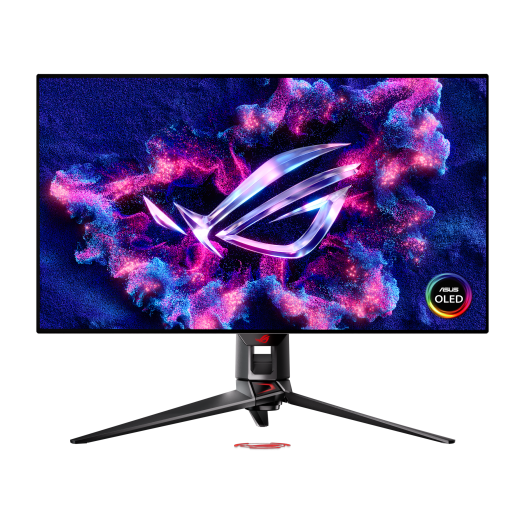
ASUS ROG Swift OLED PG32UCDP gaming monitor
₨ 499,999
Payment Methods:

Description
🌟 ASUS ROG Swift OLED PG32UCDP gaming monitor price in Pakistan
₨ 499,999 – Available at Typeshop.pk, your trusted source for authentic ASUS gaming monitors and high-end electronics. Enjoy cash on delivery, fast shipping, and a 3-year warranty.
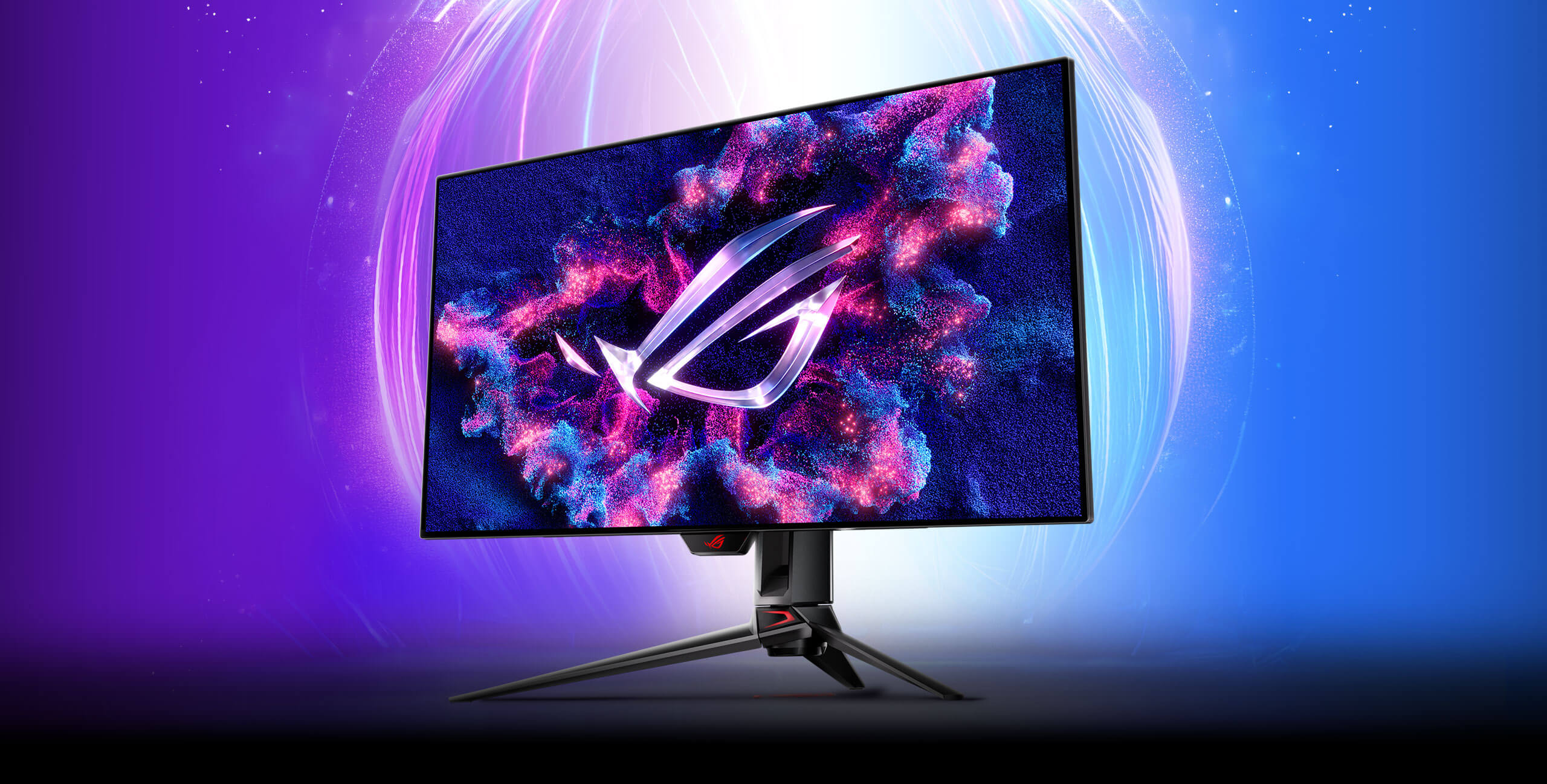
The ROG Swift OLED PG32UCDP is a 32-inch WOLED gaming monitor designed for hardcore gamers, esports athletes, and professional content creators, offering dual-mode visuals, AI-assisted gaming, and industry-leading OLED protection features.
🖥️ Groundbreaking Dual-Mode Display
-
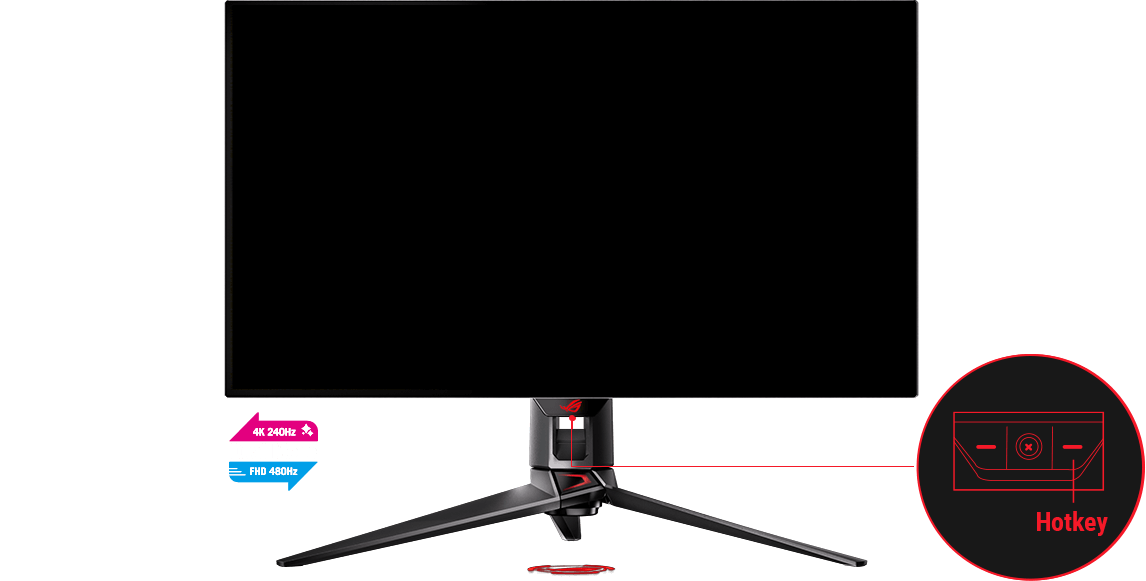
4K @ 240Hz: Perfect for high-fidelity gaming, cinematic visuals, and professional work.
-
FHD @ 480Hz: For ultra-fast competitive esports, minimizing input lag and ghosting.
-
Hotkey Switching: Seamlessly switch between 4K clarity and FHD speed.

⚡ Ultra-Fast Response & Extreme Low Motion Blur
-
0.03 ms GTG response time ensures blur-free, lag-free action.
-
ASUS ELMB (Extreme Low Motion Blur): Reduces ghosting and motion blur in fast-moving games.
-
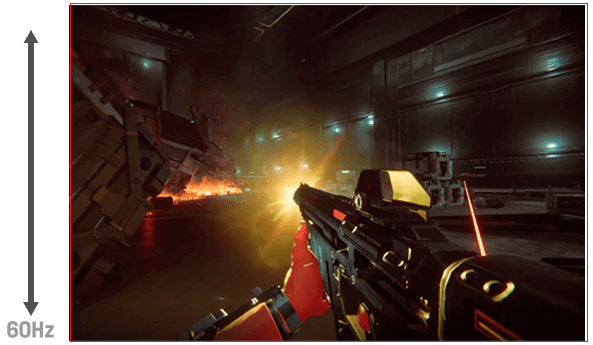
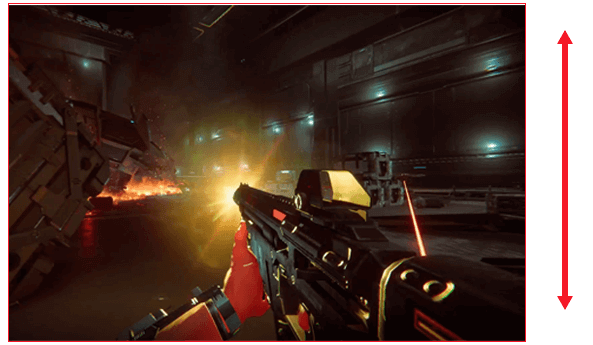
OLED Anti-Flicker Technology: Three refresh-rate modes (High/Mid/Off) for stable visuals.

-
OLED Anti-flicker

🎨 Third-Generation ROG OLED Technology
-
Vibrant colors & deep blacks with 99% DCI-P3 coverage.
-
True 10-bit color depth for rich, detailed visuals.
-
Uniform brightness: Keeps luminance consistent across the screen, even with large white areas.
-
Delta E < 2: Professional-grade color accuracy for content creators.
🤖 AI Assistant for Enhanced Gaming
AI Features
-
AI Crosshair: Auto-adjusts crosshair color for better visibility.
-
AI Shadow Boost: Enhances dark areas to spot hidden enemies.
-
AI Sniper: Zooms in on targets during practice sessions.
-
AI Visual: Adjusts monitor settings based on onscreen content.
-
MOBA Map Helper: Alerts players during group battles in MOBA games.
❄️ Advanced Custom Heatsink & Passive Cooling
-
Custom passive heatsink improves thermal dissipation.
-
Top vents enhance airflow to reduce OLED burn-in risk.
-
Keeps panel cool during extended gaming or streaming sessions.
-

🛡️ ASUS OLED Care & Longevity Features
-
Pixel Cleaning: Recalibrates pixels after long usage.
-
Screen Saver: Auto-dims after inactivity.
-
Screen Move: Slight pixel shifts to prevent burn-in.
-
Logo Brightness Adjustment: Detects static logos and dims them automatically.
🖱️ DisplayWidget Center
-
Control OLED Care features and monitor settings via intuitive software interface.
-
No need to access OSD menu manually.
-
Easily switch modes, adjust brightness, and configure AI settings.
OLED Anti-flicker ON
OLED Anti-flicker OFF
🌈 HDR & Gaming Visual Enhancements
-
VESA DisplayHDR™ 400 True Black certification.
-
MLA+ technology for 20% wider viewing angles.
-
15% brighter imagery in HDR at 10% APL compared to similar monitors.
-
Clear Pixel Edge: Reduces fringing for sharp text and UI clarity.
🎮 GamePlus & GameVisual Modes
-
FPS Counter: Monitor performance in real-time.
-
Display Alignment: Helps perfectly line up multiple monitors.
-
Sniper Mode: Precision aiming for competitive shooters.
-
Night Vision: Enhances visibility in dark game areas.

🔌 Extensive Connectivity
-
DisplayPort 1.4 (DSC): High-bandwidth 4K/240Hz support.
-
HDMI 2.1: Perfect for next-gen consoles and PCs.
-
USB-C (90W PD): Charge laptops and connect peripherals simultaneously.
-
Auto KVM: Switch inputs seamlessly with single keyboard/mouse setup.
🏆 Uniform Brightness & Ergonomics
-
Reduces eye strain during long gaming sessions.
-
Adjustable stand for height, tilt, and swivel.
-
Supports VESA wall mounting for customized setups.
-
Uniform brightness makes content consistent across the panel.
 Replay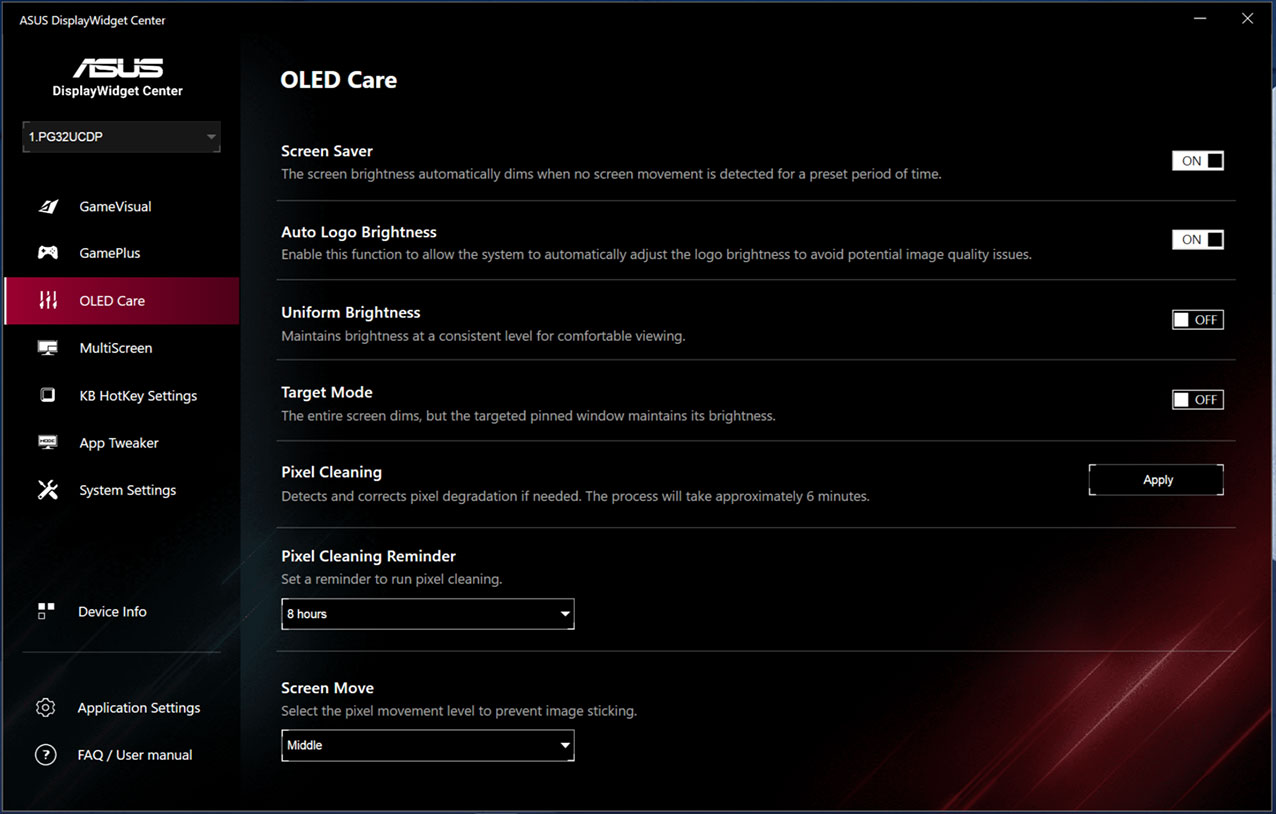
🌐 Cloud Gaming & Remote Play Optimization
-
Cloud Gaming Ready: Supports NVIDIA GeForce NOW, Xbox Cloud Gaming, and Steam Cloud Play.
-
Low-Latency Remote Play: Optimized for remote desktop or cloud streaming with minimal input lag.
-
Dynamic Bandwidth Adaptation: Adjusts visuals based on network conditions to reduce stutter.
-
AI Compression Optimization: Maintains visual fidelity during cloud gameplay.
🔧 Modular Hardware & Upgrade Potential
-
Removable Back Panel: Allows easy upgrades or maintenance without voiding warranty.
-
Accessory Ports: Optional fan modules and RGB strips for aesthetic customization.
-
Future Firmware Updates: Supports over-the-air updates for AI features and OLED optimization.
-
Custom Cooling Upgrades: Compatible with third-party passive heatsinks for extreme users.
🎨 Creative Mode for Designers & Streamers
-
Color Calibration Profiles: sRGB, AdobeRGB, DCI-P3, and Rec.2020 presets.
-
Dual Workspace Layouts: Split 32-inch screen into multiple content creation windows.
-
Live Streaming Overlay Support: Pre-configured for OBS and XSplit streaming layouts.
-
Color Blindness Modes: Special filters for accessibility and content accuracy.
🕹️ Esports Coaching & AI Analytics
-
Gameplay Analytics: AI logs in-game stats, highlights, and frame-by-frame accuracy.
-
Crosshair Heatmap: Shows where shots are landing for FPS training.
-
Shadow Detection Tracker: Analyzes dark areas of maps for strategic learning.
-
Multiplayer Optimization: Adjusts visual settings per team-based FPS, MOBA, or RTS games.
🖱️ Mouse & Peripheral Integration
-
Adaptive DPI Sync: Syncs monitor refresh rate with gaming mouse polling rate.
-
Custom Macro Display: Shows active macros or hotkeys on-screen for esports players.
-
Peripheral Feedback Integration: RGB lighting synced with on-screen events for immersion.
-
Dynamic Soundwave Visualization: Compatible with high-end gaming headsets to visualize audio cues.
🔊 Immersive Audio Enhancements
-
Spatial Audio Visualization: AI maps sound sources for competitive advantage.
-
Dynamic Dialogue Enhancer: Separates in-game speech from background noise.
-
Virtual Surround Calibration: For gaming headsets and home theater setups.
-
Low-Latency Bluetooth Audio Mode: For wireless gaming headphones.
🛡️ Cybersecurity & Privacy Features
-
Monitor-Based Screen Lock: Locks display when user leaves, without locking PC.
-
Secure USB-C Authentication: Prevents unauthorized peripherals from accessing the system.
-
AI Threat Detection: Detects anomalies in cloud gaming streams or shared screens.
-
Privacy Mode: Temporarily blurs sensitive content during streaming or video calls.
🌍 Eco & Sustainability Features
-
Power-Saving AI Mode: Reduces brightness intelligently when idle or during low-intensity gaming.
-
Recyclable Panel & Materials: OLED panel frame made from eco-conscious materials.
-
Low EMF Emission: Safe for prolonged exposure.
-
Smart Sleep Mode: Automatically dims and shuts down unused inputs.
🔄 Multi-Monitor Ecosystem
-
Automatic Color Sync Across Monitors: Ensures consistent visuals in multi-monitor setups.
-
AI Seamless Bezel Adjustment: Reduces gaps in multi-screen layouts.
-
Cross-Device Profiles: Saves monitor settings to USB or cloud for quick setup on another monitor.
-
Split-Mode Multi-Input: Allows different devices on different halves of the screen.
📊 Professional Benchmarking & Performance Reports
-
Integrated FPS & Latency Tracker: Shows real-time stats without third-party software.
-
AI Benchmarking Mode: Automatically tests display performance for HDR, color, and refresh rates.
-
Custom Heat Map Overlays: Identifies stress points for long-term panel health.
-
VR & AR Performance Mode: Pre-configured settings for mixed reality applications.
🤝 Collaborative Features for Teams
-
Shared Workspaces: Allows multiple users to work on the same screen remotely.
-
AI Suggestions: Monitors collaborative sessions and suggests optimal window layouts.
-
Real-Time Video Annotation: Mark points on-screen for presentations or training.
-
Multi-User Profiles: Switch between multiple gamers or creators instantly.
🔧 Adaptive Firmware & AI Enhancements
-
Self-Learning AI: Monitors user habits and adjusts refresh rates, brightness, and game settings automatically.
-
Game-Specific Presets: Auto-downloads optimized settings for popular games.
-
OLED Health Tracker: Predicts panel wear and suggests preventive maintenance.
-
Firmware Update Notifications: Ensures AI features are always current and optimized.
🎓 Learning & Educational Uses
-
Interactive Learning Mode: Enhances color contrast and readability for students.
-
Visual Focus Enhancer: Highlights key sections for lectures, diagrams, and tutorials.
-
Dynamic Zoom & Split Mode: Supports multiple teaching inputs simultaneously.
-
AI Reading Assistant: Tracks eye movement and adjusts content for clarity and focus.
🏡 Home Office & Productivity Mode
-
Document & Spreadsheet Optimization: Auto enhances text readability and sharpness.
-
Video Conferencing Mode: Reduces glare and improves webcam color perception.
-
Dynamic Taskbar Brightness: Lowers brightness on static UI elements to save power.
-
Auto-Adjust Window Scaling: For multiple applications on large screen.
🌐 Extended Cloud & Remote Features
-
AI Stream Stability: Reduces visual lag during cloud gaming and remote desktop sessions.
-
Multi-Device Mirroring: Mirrors content from laptop, console, and smartphone simultaneously.
-
Remote Calibration: Adjust settings from anywhere using mobile or web interface.
-
Latency Monitoring: Detects network issues affecting display performance.
🔑 Accessibility & Inclusive Design
-
Color Blind Filters: Deuteranopia, Protanopia, and Tritanopia modes.
-
Voice Feedback: Provides AI assistance for visually impaired users.
-
Custom Text Scaling: Adjust font size and interface elements dynamically.
-
Adaptive Contrast: Automatically adjusts for high-light or low-light environments.
🧪 Experimental AI & Developer Features
-
API Access for Developers: Integrate monitor AI with custom software.
-
Plugin Ecosystem: Supports third-party enhancements for gaming or content creation.
-
Custom Macro AI: Developers can create AI-assisted macros for productivity or gameplay.
-
VR/AR Calibration Toolkit: Optimize visuals for next-gen immersive experiences.
📦 New Package & Accessories
-
OLED Panel Cleaning Kit: Safe microfiber & solution for WOLED maintenance.
-
RGB Backlight Modules: Customizable ambient lighting.
-
Portable Display Stand: For LAN parties or esports events.
-
Cable Management Kit: Organize HDMI, DisplayPort, and USB-C connections neatly.
🌌 Next-Gen OLED Immersion for Cinematic Experiences
-
Ultra-Wide HDR Color Volume: Enjoy richer cinematic color depth for movies and series.
-
AI Cinematic Mode: Automatically optimizes film and series playback frame-by-frame.
-
High Dynamic Range Storytelling: True blacks and vibrant highlights make movies feel lifelike.
-
Smart Aspect Ratio Adjustment: Automatically fits cinematic 21:9 content with minimal letterboxing.
🏎️ High-Speed Racing & Simulation Mode
-
AI Motion Smoothing: Reduces blur in racing simulators and flight games.
-
Steering Response Optimization: Low-latency sync between steering wheel and display.
-
VR Racing Prep Mode: Calibrated for immersive VR racing experiences.
-
Dynamic Dashboard Overlay: Displays real-time telemetry, speed, and lap timing for simulators.
🧩 Modular Gaming Customization
-
Interchangeable Stand Modules: Adjust height, tilt, swivel, and rotation independently.
-
Customizable Cooling Modules: Add or remove fan modules depending on ambient room temperature.
-
Removable RGB Accent Panels: Personalize aesthetics for streamers and esports setups.
-
Integrated Cable Channeling: Keep cables hidden and organized for tournament-ready setups.
🎙️ Advanced AI Voice Integration
-
In-Game Voice Commands: Adjust brightness, contrast, and crosshair with simple voice prompts.
-
AI Game Assistant: Provides real-time hints and strategic suggestions without leaving the game.
-
Customizable Alerts: Voice prompts notify you about low health, cooldowns, or team activity.
-
Voice-Driven Settings: Switch monitor modes, color profiles, or refresh rates via voice.
🌈 Adaptive Color Management
-
AI Scene Detection: Adjusts color profiles based on what’s on screen—gaming, video, or productivity.
-
Ambient Lighting Sync: Matches room lighting to on-screen content for maximum immersion.
-
Automatic Color Calibration: Keeps color accurate over time without manual adjustments.
-
Professional Color Modes: Optimized for video editing, photography, and streaming.
🔍 AI-Powered Gaming Analytics
-
Performance Heatmaps: Displays player movement, engagement hotspots, and FPS density.
-
Enemy Detection Aid: Highlights hidden or camouflaged opponents automatically.
-
Skill Tracking Metrics: Tracks reaction times, aim precision, and consistency.
-
Game Replay Analyzer: Provides post-game insights with AI suggestions for improvement.
💻 Productivity & Multi-Tasking Features
-
AI Workspace Organizer: Automatically arranges multiple windows and apps.
-
Dual Input Mode: Connects two PCs or laptops simultaneously with separate sections of the screen.
-
Document Optimizer: Enhances readability of spreadsheets, PDFs, and web documents.
-
Smart Notifications: Minimizes distractions while maintaining important alerts on-screen.
🛡️ Monitor Safety & Health Features
-
Dynamic Eye Comfort Mode: Reduces blue light based on ambient light and user distance.
-
OLED Burn-In Prevention: Advanced pixel shifting and screen saver integration.
-
Heat Monitoring & Alerts: Displays warnings if internal temperature exceeds optimal levels.
-
AI Inactivity Detection: Auto-dims the screen when the user is away or inactive.
🌍 Remote Work & Collaboration
-
Multi-User Profile Switching: Quickly switch between gaming and professional setups.
-
Remote Display Adjustment: Adjust monitor settings from a laptop or mobile device.
-
Collaborative Annotation: Mark or highlight content in real-time for team projects.
-
Virtual Meeting Enhancer: Optimizes contrast, color, and clarity for video calls.
🎓 Education & e-Learning Enhancements
-
Interactive Learning Tools: Highlights key sections of digital textbooks or slides.
-
Focus Mode: Reduces distractions by dimming non-essential UI elements.
-
Real-Time Lecture Capture: AI adjusts brightness and sharpness for recorded lessons.
-
Eye-Tracking Assistance: Guides student attention to key parts of the screen.
🏡 Home Theater & Entertainment Hub
-
Smart TV Integration: Compatible with streaming devices and apps via HDMI or USB-C.
-
Surround Sound Optimization: Automatically adjusts audio output based on room setup.
-
Movie & Series AI Enhancements: Enhances shadow detail, highlights, and color vibrancy.
-
Dynamic Ambient Sync: Syncs room lighting with on-screen visuals for full immersion.
🕹️ VR & AR Gaming Ready
-
Optimized for VR Headsets: Supports ultra-low latency and precise refresh synchronization.
-
AR Overlay Calibration: Aligns augmented content with real-world objects.
-
Motion Blur Minimization: AI reduces latency and ghosting for immersive VR experiences.
-
360° Viewing Support: Maintains color and contrast consistency in all angles.
🔧 Developer & AI Customization
-
Open API for AI Developers: Integrate monitor AI with custom apps or workflows.
-
Custom Macro Recording: Record complex sequences with AI-assisted precision.
-
VR/AR Calibration Toolkit: Test and optimize content for immersive applications.
-
Plugin Ecosystem: Expand AI and monitor capabilities with third-party plugins.
⚡ Extreme Overclocking & Dual Mode Insights
-
Adaptive Refresh Rate Scaling: AI dynamically scales between 240Hz and 480Hz for performance balance.
-
Dynamic Resolution Mode: Switch between 4K and FHD for high-speed gameplay.
-
Overclock Safety Profiles: Monitors temperature, panel wear, and voltage for safe overclocking.
-
Real-Time Performance Stats: Track FPS, frame time, and latency on-screen.
📦 Premium Accessories & Setup Tools
-
OLED Cleaning Kit: Safe microfiber cloths and solution for WOLED maintenance.
-
Custom Mounting Kits: Compatible with VESA, desk, and gaming rig setups.
-
Cable Organizer Pack: Manage HDMI, DisplayPort, and USB-C cables neatly.
-
Ambient Lighting Kit: Modular RGB for full gaming immersion.
🔊 Audio & Multi-Sensory Enhancements
-
3D Audio Visualization: Tracks sound sources for better spatial awareness.
-
In-Game Voice Clarity: Reduces environmental noise to focus on player or team communication.
-
Dynamic Bass & Treble: AI adjusts audio frequencies based on scene or game type.
-
Headphone Sync: Automatically syncs AI audio optimization to wired or wireless headphones.
🏆 Tournament & Esports Features
-
Pro Mode Presets: Pre-configured settings for FPS, MOBA, RTS, and racing esports.
-
Anti-Cheat Visual Tools: Reduces visual anomalies that can be exploited unfairly.
-
Performance Logging: Stores frame rate, input lag, and G-SYNC performance for post-match review.
-
LAN Party Optimization: Easy quick-connect profiles for multi-monitor setups.
❓ ASUS ROG Swift OLED PG32UCDP – FAQs
-
Price in Pakistan? ₨ 499,999
-
Screen size? 32-inch (31.5” viewable)
-
Panel type? WOLED
-
Resolution? 4K UHD, FHD dual mode
-
Refresh rate? 4K @ 240Hz, FHD @ 480Hz
-
Response time? 0.03ms GTG
-
HDR support? VESA DisplayHDR 400 True Black
-
Color gamut? 99% DCI-P3
-
OLED Care included? Yes
-
AI features? Crosshair, Shadow Boost, Sniper, Visual, MOBA Map Helper
-
Burn-in protection? Yes, pixel cleaning & screen saver
-
Connectivity? DisplayPort 1.4, HDMI 2.1, USB-C 90W PD
-
Adaptive sync? G-SYNC® compatible, FreeSync Premium Pro
-
Uniform brightness? Yes
-
Ergonomics? Height, tilt, swivel adjustable
-
VESA mount compatible? Yes
-
Cooling system? Custom heatsink & vents
-
Aspect ratio control? 24.5” / 27” / 32”
-
GamePlus included? Yes
-
ELMB support? Yes
-
OLED anti-flicker? Yes
-
Ideal for esports? Yes
-
AI Visual release date? August 2024
-
Pixel cleaning auto? Yes
-
Screen move? Yes
-
Logo brightness adjustment? Yes
-
Suitable for streaming? Yes
-
Professional editing? Yes
-
Multi-device workflow? Yes
-
Auto KVM? Yes
-
Hotkey switching? Yes
-
Eye strain reduction? Yes
-
Low blue light? Yes
-
Color accuracy? Delta E < 2
-
Warranty? 3 years
-
Extreme low motion blur? Yes
-
GameVisual presets? Yes
-
HDR brightness? 15% brighter imagery
-
Anti-flicker modes? High/Mid/Off
-
Future-proof for next-gen gaming? Yes
ASUS ROG Swift OLED PG32UCDP gaming monitor price in Pakistan
Thanks For Visiting Typeshop
Customer Reviews
Related Products

Meta Quest 3 Price in Pakistan 128GB VR Headset in 2024




Reviews
Clear filtersThere are no reviews yet.