











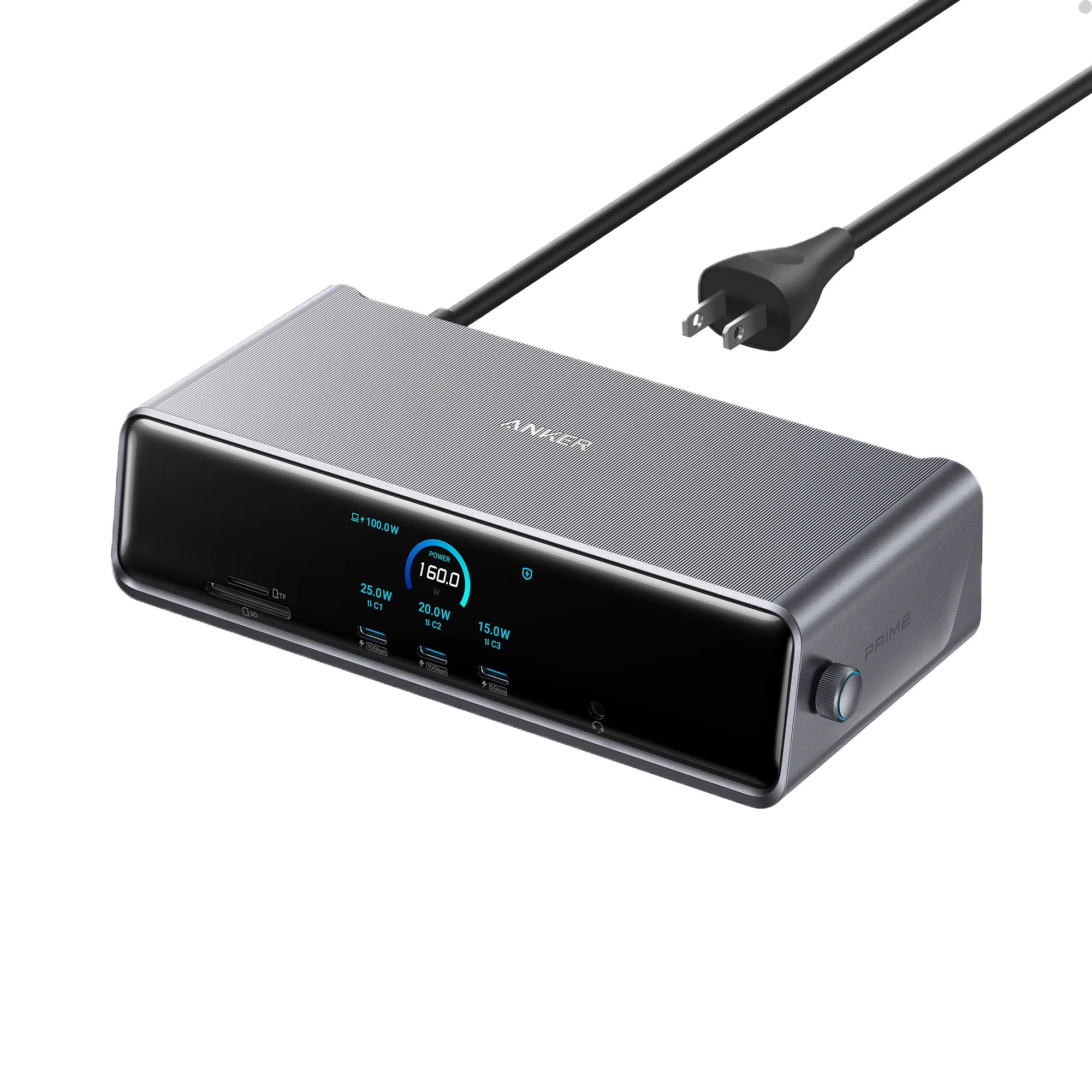
Anker Prime Docking Station (14-in-1, Triple Display, DisplayLink) with DL7400
-
14 Powerful Connections
-
One 8K Output, Triple Display Versatility
-
Each Port Powers and Performs
-
Always Cool, Always in Control
₨ 81,999
Contact on WhatsApp, for discount and more information.
Description
⚡Anker Prime Docking Station price in Pakistan
The Anker Prime Docking Station (14-in-1, Triple Display, DisplayLink DL7400) is a premium docking solution built for professionals, creators, gamers, and power users. Offering triple-monitor support, 8K resolution, 140W laptop charging, and high-speed 10Gbps data transfer, it transforms any laptop into a full-fledged workstation.
Whether you’re a video editor, financial trader, software developer, or remote worker, the Anker Prime Dock ensures your setup is fast, reliable, and clutter-free.
Price in Pakistan: ₨ 81,999 at Typeshop.pk – 100% authentic and genuine.

🖥️ Triple Display Power – Productivity Redefined
With DisplayLink DL7400 technology, the Anker Prime Docking Station supports three simultaneous monitors, including:
-
HDMI
-
DisplayPort
-
DisplayLink-compatible USB-C
🔹 Key Display Features
-
8K @ 30Hz for a single monitor
-
4K @ 120Hz for high-refresh setups
-
HDR & high-bandwidth support for photo, video, and content creators
-
Extended displays for MacBook M1/M2/M3/M4 and Windows laptops
This makes it ideal for multi-tasking, coding, trading, and creative editing workflows.
💻 Fast Charging & Power Delivery
The dock delivers up to 140W upstream charging for laptops, alongside fast charging for USB-C devices. Key benefits include:
-
Charge laptops, phones, and tablets simultaneously
-
Eliminate extra adapters with a built-in power supply
-
Keep your desk clutter-free and organized
⚡ High-Speed Data Transfers
The Anker Prime Dock includes 10Gbps USB-C & USB-A ports, allowing:
-
Lightning-fast file transfers for external SSDs and hard drives
-
Backup and transfer of large 4K/8K video projects
-
Connection for audio interfaces, cameras, and peripherals
🌐 Ultra-Fast Networking
With 2.5Gbps Ethernet, the dock ensures:
-
Smooth cloud backups
-
Lag-free online gaming
-
Stable video conferencing for remote work
-
High-speed data for multi-device setups


🆒 Smart Display – Real-Time Device Intelligence
The built-in smart display provides real-time information about:
-
Power and charging status
-
USB-C port wattage
-
Display resolutions and refresh rates
-
Active port usage
It even doubles as a desktop clock screensaver synced to your system.
🛠️ Control Everything with Anker Dock Manager
The Anker Dock Manager App allows professionals to:
-
Update firmware
-
Monitor port usage
-
Adjust charging priorities
-
Customize display settings
-
View temperature and fan activity
This ensures full control over your workstation, ideal for offices and creative studios.
❄️ Active Cooling for Heavy Workloads
High-performance docking generates heat. The Anker Prime Dock features:
-
Dual fans
-
Intelligent cooling curve
-
Thermal safety system
This keeps the dock cool and stable, even under extended heavy use.

🏢 Professional Use Cases
1. Content Creation & Video Editing
Edit multiple 4K/8K video streams, connect external storage, and monitor previews on three displays.
2. Trading & Financial Workstations
Track multiple charts, dashboards, and news feeds simultaneously without lag.
3. Software Development & Coding
Compile code, run virtual machines, and debug on multiple screens efficiently.
4. Remote Work & Home Offices
Connect all peripherals, charge devices, and ensure stable internet for video conferencing.
5. Creative Design & Photography
Work on layered Photoshop projects or Illustrator files across multiple monitors for a streamlined workflow.
🔌 14-in-1 Ports Overview
-
3 × Display Outputs (HDMI, DP, DisplayLink)
-
3 × USB-C 10Gbps (with Fast Charging)
-
3 × USB-A 10Gbps
-
2 × USB-A Charging Ports
-
2.5Gbps Ethernet
-
SD & TF Card Slots
-
140W Upstream Laptop Charging
All ports are designed for maximum performance, allowing seamless connectivity of all professional devices.


⚡ Mac & Windows Compatibility
-
macOS: Extended display support on M1, M2, M3, M4, and Intel Macs via DisplayLink
-
Windows: Triple-display support with DP Alt Mode USB-C laptops
-
Perfect for hybrid setups using both Mac and Windows machines


Active Cooling for High-Performance Use
High-speed data transfer and triple-display output generate heat.
Anker includes:
-
Dual fans
-
Intelligent cooling curve
-
Thermal safety system
This ensures optimal performance even under heavy workloads.

10Gbps Data Transfer + 2.5Gbps Ethernet
10Gbps USB Ports
Transfer large files, videos, and backups 10× faster compared to standard ports.
2.5Gbps Ethernet
Perfect for:
-
Streaming
-
Cloud backups
-
Online gaming
-
Workstations requiring high network throughput

A Cleaner Workspace – Built-In Power Supply
Unlike bulky docks requiring separate power bricks, Anker’s Prime Dock has a built-in power supply, giving you:
-
A clean desk
-
Fewer cables
-
Fast laptop charging
-
Stable performance without external adapters


🌟 Why the Anker Prime Docking Station 14-in-1 is a Game-Changer
The Anker Prime Dock 14-in-1 is not just a dock—it’s a complete desktop ecosystem. It combines power delivery, triple-display support, ultra-fast data, and smart management, all in one compact unit.
Whether you work in video production, coding, design, or finance, this dock transforms any laptop into a full-fledged workstation, eliminating the need for multiple adapters and tangled cables.
🖥️ Creative Professionals’ Dream
Video Editors & Animators
-
Edit 4K and 8K footage across multiple screens
-
Connect external SSDs at 10Gbps for faster rendering
-
Display reference material on one monitor while editing on another
Graphic Designers & Illustrators
-
Use tablets and color-accurate displays simultaneously
-
HDR & high-refresh support ensures precise color grading
-
Keep design files backed up to external drives without slowdown
Streamers & Content Creators
-
Run streaming software, chat, and video feeds on separate monitors
-
Charge devices while maintaining full-speed internet via 2.5Gbps Ethernet
-
Keep webcams, microphones, and lights connected without extra adapters
💼 Professionals & Corporate Use
Traders & Analysts
-
Monitor real-time market data, charts, and news on triple displays
-
Fast USB-C and USB-A ports support external storage and peripherals
-
Stable Ethernet ensures zero-lag transactions
Remote Workers & Hybrid Offices
-
Connect conference cameras, headsets, and multiple monitors seamlessly
-
Power laptops and accessories while keeping a clean, clutter-free desk
-
Active cooling keeps the dock safe during long video calls
Developers & Engineers
-
Compile code on one screen, test on another, monitor logs on a third
-
USB-C ports allow connection to external devices for testing and deployment
-
Smart display and Dock Manager app provide real-time insights
🌐 Perfect for Multi-Monitor Gaming Setups
Gamers can also benefit:
-
Triple monitor support for immersive gaming experiences
-
Up to 4K/120Hz or 8K/30Hz display output for crisp visuals
-
USB-C fast-charging ports keep gaming laptops powered during extended sessions
-
2.5Gbps Ethernet ensures low-latency online gameplay
🔌 Port Spotlight: All 14-in-1 Explained
-
3 Display Outputs: HDMI, DP, DisplayLink for triple-monitor setups
-
3 USB-C 10Gbps Ports: Fast charging and data transfer
-
3 USB-A 10Gbps Ports: High-speed legacy device connectivity
-
2 USB-A Charging Ports: Phone/tablet fast charge
-
2.5Gbps Ethernet: Stable, high-speed networking
-
SD/TF Slots: Easy access for media transfer
-
140W Upstream Charging: Powers laptops without extra adapters
This design consolidates all essential connectivity, perfect for workstations.
🛠️ Smart Features
-
Smart Display: Shows real-time charging, port usage, and display resolutions
-
Anker Dock Manager App: Update firmware, monitor usage, control charging
-
Active Cooling System: Dual fans maintain performance under heavy load
-
Built-In PSU: Eliminates messy external adapters
🧩 Compatibility
-
macOS: Supports M1/M2/M3/M4 via DisplayLink
-
Windows: Full triple-monitor support for laptops with DP Alt Mode
-
Linux: Partial support, DisplayLink drivers required
-
Works with ultrawide monitors, HDR displays, and high-refresh setups
🖱️ Real-World Use Cases
-
Creative Studio: Connect color-calibrated monitors, tablets, cameras, and storage
-
Trading Desk: Triple display dashboards with real-time updates
-
Software Development: Multi-screen coding, virtual machines, and debugging
-
Hybrid Office Setup: Conference cameras, laptops, monitors, and audio equipment
-
Gaming & Streaming: Multi-monitor immersive setup with peripherals
💡 Productivity Tips
-
Set USB-C ports for PD devices only to optimize charging
-
Use DisplayLink for MacBook extended display support
-
Monitor dock temperature via Anker Dock Manager app
-
Organize cables using built-in PSU to maintain a clean desk
-
Connect SSDs to 10Gbps ports for large video or graphic files
🚀 Future-Ready Workstations with Anker Prime Dock
The Anker Prime Docking Station 14-in-1 is more than a hub—it’s the centerpiece of a next-generation workstation. Beyond just connecting monitors, it allows users to reimagine their workflow for speed, efficiency, and productivity.
Whether you’re a digital nomad, creative professional, or home office warrior, this dock enables desktop-class experiences from any laptop.
🎨 Creative Workflow Innovations
Multi-App Multi-Tasking
-
Open multiple apps on triple-monitor setups without lag
-
Run video editing, coding, and research simultaneously
-
Keep reference material, chat, and emails visible without crowding screens
High-Fidelity Content Creation
-
HDR-enabled monitors allow accurate color grading and graphic design
-
10Gbps USB-C ports speed up file transfers for large video and audio files
-
Plug in external audio interfaces for studio-quality recording
Live Streaming & Content Production
-
Connect cameras, microphones, lighting, and monitors seamlessly
-
Use triple displays for gameplay, streaming chat, and dashboard monitoring
-
Built-in power ensures devices stay charged during long recording sessions
💻 Productivity-Boosting Features
Smart Desk Organization
-
Built-in PSU reduces the number of cables on your desk
-
USB-C and USB-A ports keep devices powered without additional adapters
-
Smart display shows port usage, device charging, and temperature
Remote Work Made Easy
-
Ideal for Zoom, Teams, and Google Meet with stable 2.5Gbps Ethernet
-
Triple-display output allows multi-window workflow during video calls
-
Use Dock Manager App to optimize charging and monitor real-time system info
Gaming & Simulation Workflows
-
Connect ultrawide monitors for flight simulators or racing setups
-
Supports 4K/120Hz and 1080p/144Hz refresh rates for smooth gameplay
-
Ethernet ensures low-latency competitive gaming
🔧 Advanced Dock Management
The Anker Dock Manager App takes dock functionality to the next level:
-
Firmware Updates: Keep your dock running with latest improvements
-
Port Monitoring: Check which devices are connected and their usage
-
Cooling Control: Adjust fan speed based on workload
-
Display Settings: Optimize resolution, refresh rate, and display modes
🌐 High-Speed Networking
2.5Gbps Ethernet – The Backbone of Professional Workflows
-
Ideal for cloud-based file storage, real-time collaboration, and streaming
-
Reduces network congestion for high-bandwidth tasks
-
Supports VPNs, video conferencing, and secure corporate connections
Multi-Device Internet Stability
-
Keep laptops, desktops, and other peripherals connected without lag
-
Perfect for team workstations or home offices with multiple users
🧩 Unique Use-Cases
For Architects & 3D Designers
-
Triple-monitor setups for CAD, 3D rendering, and simulation tools
-
USB-C ports support high-speed data transfer from 3D scanners
For Photographers
-
Edit RAW files across multiple monitors
-
Transfer large image batches to external SSDs in seconds
For Entrepreneurs & Startups
-
Clean, cable-free workstation for conference rooms
-
All devices powered and monitored from one central dock
⚡ Creative Power Management
-
140W laptop charging ensures no downtime during heavy workloads
-
USB-C ports can charge tablets, phones, and laptops simultaneously
-
Smart display provides real-time power consumption feedback
🖱️ Tips to Maximize Productivity
-
Use DisplayLink for MacBooks to unlock multiple monitor support
-
Connect SSDs to USB-C 10Gbps ports for fastest data transfer
-
Enable active cooling during extended high-performance tasks
-
Organize peripherals using the smart display for easy monitoring
-
Pair with ergonomic monitors to reduce eye strain in multi-screen setups
🌟 Why Professionals Choose Anker Prime Dock
-
Future-proof triple-display support for 8K & 4K monitors
-
10Gbps USB-C & USB-A ports for fastest data transfers
-
Active cooling ensures stable operation under heavy workloads
-
Built-in PSU keeps desk clean and organized
-
Smart display + Dock Manager app allows full control and monitoring
⚡ The Ultimate Productivity Hub – Anker Prime Docking Station
The Anker Prime Docking Station 14-in-1 is not just a docking station—it’s the heart of a high-performance workstation. Designed for professionals, creators, and multitaskers, it brings enterprise-grade power, connectivity, and organization to any desk setup.
From triple-display 8K setups to ultra-fast data transfer, this dock transforms laptops into desktop-class powerhouses, making it a must-have for anyone serious about productivity.
🖥️ Triple Display Workflows – Beyond Traditional Monitors
Multi-Screen Productivity
With support for three external monitors, the Anker Prime Dock allows users to:
-
Run multiple apps simultaneously without lag
-
Keep coding windows, spreadsheets, and reference materials visible at all times
-
Switch between tasks effortlessly, boosting efficiency and focus
This is particularly useful for software developers, financial analysts, and digital designers who need real-time data and multiple visual dashboards.
Immersive Content Creation
The dock supports 8K @ 30Hz or 4K @ 120Hz, enabling high-fidelity visual work for:
-
Video editors working with 4K/8K footage
-
Graphic designers handling ultra-high resolution projects
-
Animators and VFX professionals needing precise color grading
This feature makes it possible to see every detail clearly across multiple monitors, enhancing both accuracy and creativity.
🔌 High-Speed Data & Peripheral Integration
10Gbps USB-C and USB-A Ports
All ports support ultra-fast data transfer, perfect for large media files, SSDs, and external drives. Users can:
-
Transfer 4K videos and RAW images in seconds
-
Connect audio interfaces for professional sound recording
-
Sync multiple devices without bottlenecks
USB-C Fast Charging
The dock can provide up to 140W of power to laptops while also charging phones, tablets, and peripherals through other USB-C ports. This ensures:
-
Continuous workflow without battery interruptions
-
Multi-device charging from a single central hub
SD/TF Card Slots for Creators
Photographers and videographers can use the SD and TF slots for quick file transfers from cameras or drones, making the dock a central media hub.
🌐 Networking & Connectivity for Professionals
2.5Gbps Ethernet – The Reliable Backbone
The high-speed Ethernet port is ideal for:
-
Cloud-based workflows and file transfers
-
Stable online gaming and low-latency video calls
-
Workstations requiring fast and secure network connections
This is especially valuable for remote work where Wi-Fi alone may not be reliable.
Multi-Device Internet Integration
With multiple devices connected, the Anker Prime Dock ensures consistent connectivity without network slowdown. This is perfect for small offices, home workstations, or co-working spaces.
🎨 Creative Professional Use-Cases
Architects & Engineers
-
Connect CAD software across multiple monitors
-
Use external GPUs for rendering complex designs
-
Display blueprints, modeling software, and references simultaneously
Photographers & Videographers
-
Edit RAW and high-resolution video files across triple-monitor setups
-
Transfer files directly from high-speed SD cards
-
Keep video editing, color grading, and preview monitors open at once
Entrepreneurs & Business Professionals
-
Maintain multiple dashboards on different screens
-
Monitor stock prices, analytics, and project management apps
-
Collaborate remotely using high-quality Ethernet and multiple displays
⚙️ Dock Manager App – Control Everything
The Anker Dock Manager App turns the dock into a smart device:
-
Update firmware automatically
-
Monitor port usage and device connections
-
Customize display settings, refresh rates, and resolutions
-
Adjust cooling preferences for heavy workloads
This makes the dock intelligent and self-managing, ideal for users who want a hands-off workstation.
❄️ Active Cooling & Thermal Safety
Triple-display output and fast data transfer generate heat. Anker solves this with:
-
Dual fans for continuous airflow
-
Intelligent fan curves to prevent overheating
-
Thermal safety system ensuring stable long-term performance
This guarantees consistent performance even under heavy workloads like video editing, 3D modeling, or gaming.
💻 Multi-Platform Compatibility
macOS Compatibility
Thanks to DisplayLink DL7400, the dock unlocks multi-display support on M1, M2, M3, and M4 MacBooks, overcoming Apple’s single-monitor limitation.
Windows Laptops
Windows laptops with USB-C DP Alt Mode can seamlessly connect three extended displays. This enables:
-
Complex trading setups
-
Multi-app software development
-
Professional-grade video editing
Linux Support
Partial support is available on Linux. While DisplayLink software is needed, developers and Linux users can still benefit from high-speed connectivity and charging.
🎮 Gaming & Simulation Applications
-
Ultrawide monitors supported for immersive setups
-
High refresh rates (120Hz+) for smooth visuals
-
Ethernet ensures low-latency online gaming
-
Ideal for flight simulators, racing setups, and multi-monitor strategy games
This makes the dock appealing not just for professionals but also serious gaming enthusiasts.
🔧 Optimizing Your Workspace
-
Arrange displays strategically for multitasking
-
Use DisplayLink for macOS to enable triple displays
-
Connect high-speed storage to 10Gbps USB-C for fast file access
-
Monitor power usage via the smart display
-
Adjust fan settings in Dock Manager for extended workloads
🌟 Benefits of Choosing Anker Prime Dock
-
Triple-monitor 8K/4K support for visual professionals
-
Fast charging and high-speed data transfer for productivity
-
Built-in PSU reduces clutter and cable management
-
Smart display + Dock Manager ensures full monitoring & control
-
Active cooling prevents overheating during heavy workloads
⚡ Real-World Examples
Content Creator Setup
-
Triple 4K monitors for video editing
-
10Gbps USB-C SSDs for fast file transfer
-
Ethernet connection for live streaming
-
All powered and monitored from a single dock
Developer Setup
-
One monitor for code, another for reference, a third for debugging
-
USB-A devices connected for keyboards, mice, and testing tools
-
Dock Manager ensures devices stay powered and cool
Trading & Analytics Setup
-
Triple-screen setup for stock monitoring
-
Low-latency Ethernet ensures real-time updates
-
Centralized hub reduces desk clutter and improves workflow
❓ Frequently Asked Questions (30–40)
-
Price in Pakistan? – ₨ 81,999 at Typeshop.pk
-
How many ports? – 14-in-1
-
Supports triple displays? – Yes
-
MacBook M1/M2 compatible? – Yes, via DisplayLink
-
Windows compatible? – Yes
-
Maximum resolution? – 8K @ 30Hz
-
4K at 120Hz? – Supported
-
Laptop charging wattage? – Up to 140W
-
DisplayLink chipset? – DL7400
-
Can charge phones? – Yes
-
Ethernet speed? – 2.5Gbps
-
Active cooling? – Yes
-
Gaming setup suitable? – Yes, triple monitor setups
-
Ultrawide monitor support? – Yes
-
HDR support? – Depends on monitor
-
Smart display useful? – Yes
-
Disable smart clock? – Yes
-
PD 3.1 supported? – Yes
-
Linux compatible? – Partially
-
Built-in power supply? – Yes
-
USB-C 10Gbps? – All ports
-
SD/TF support? – Yes
-
Triple monitor on MacBook? – Yes
-
Video editor friendly? – Absolutely
-
Need software? – DisplayLink software required
-
Gaming at 144Hz? – Supported via 4K/120Hz
-
iPad Pro compatible? – Limited monitor output
-
Charge iPhones? – Yes, via USB-C
-
Daisy-chain monitors? – No, separate outputs needed
-
Trading setups suitable? – Yes
-
External SSD support? – 10Gbps speed
-
External cooling needed? – No
-
Firmware upgradable? – Yes
-
HDMI 2.1 support? – Yes, depending on mapping
-
Multiple device charging? – Yes
-
Heavy duty? – Yes, solid build
-
VPN networks supported? – Yes
-
Desktop PC use? – Yes, with USB-C
-
DisplayLink safe? – Yes, reliable for professional use
-
Worth the price? – Yes, for triple display & high-performance users
✅ Final Verdict
The Anker Prime Docking Station 14-in-1 is a professional-grade, future-proof dock:
-
Triple-display 8K output
-
140W laptop charging
-
High-speed 10Gbps USB-C and USB-A ports
-
2.5Gbps Ethernet for stable connectivity
-
Active cooling & smart display for workstation management
Price in Pakistan: ₨ 81,999 at Typeshop.pk – Perfect for creators, traders, gamers, and professionals seeking ultimate desktop productivity.




Reviews
Clear filtersThere are no reviews yet.