









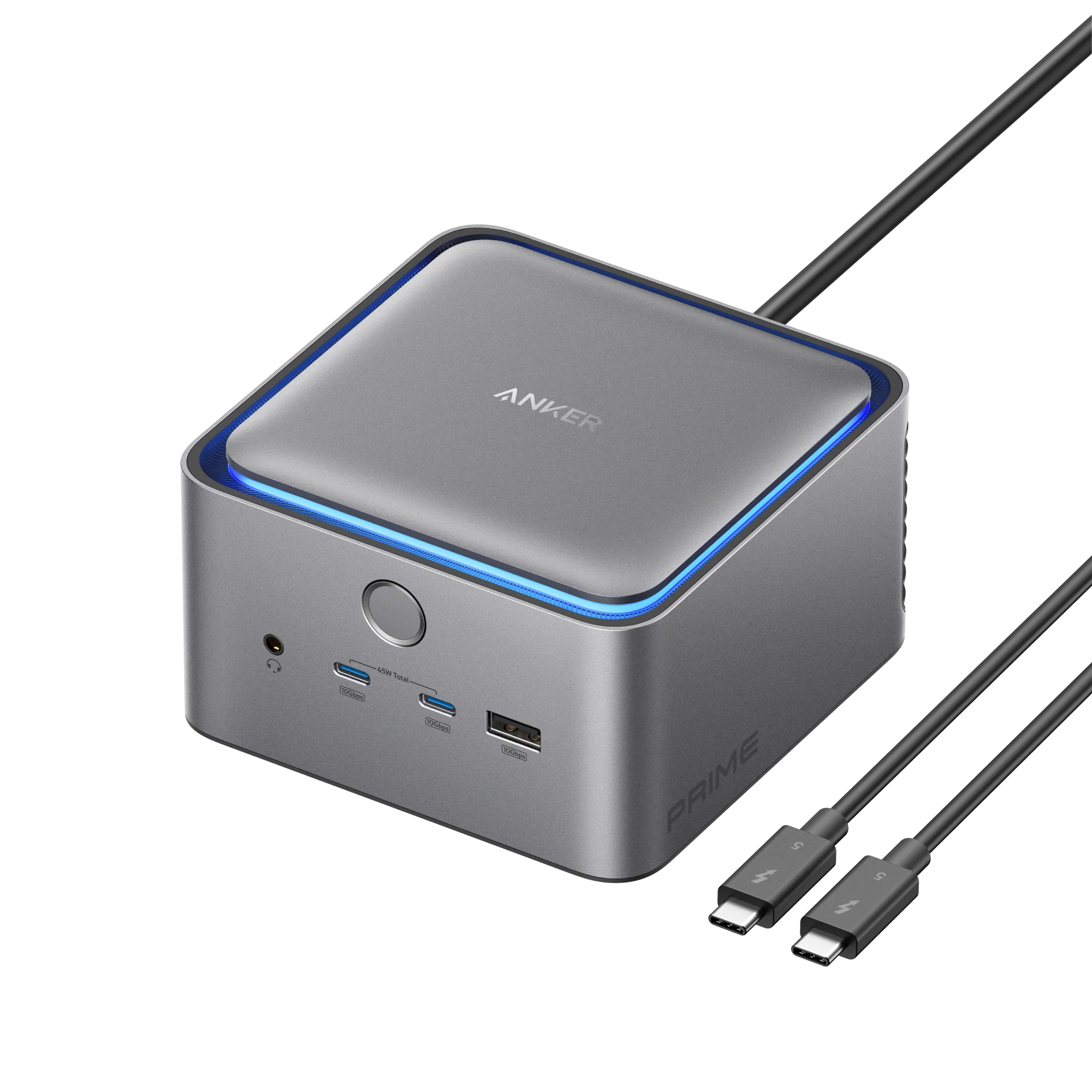
Anker Prime TB5 Docking Station (14-in-1, 8K, Thunderbolt 5 )
₨ 99,999
Payment Methods:

Description
⚡Anker 14 in 1 docking station price in pakistan
The Anker Prime TB5 Docking Station (14-in-1, 8K, Thunderbolt 5) is a premium Thunderbolt 5 hub designed for professionals, creatives, gamers, and remote workers. With 14 versatile ports, including Thunderbolt 5, USB-C, USB-A, HDMI 2.1, DisplayPort 2.1, SD/microSD, Ethernet, and audio, this dock transforms any workspace into a productivity powerhouse.
It supports stunning 8K visuals, high-speed data transfer, and up to 232W power delivery, ensuring fast charging and stable connectivity for all your devices. Its sleek aluminum design, built-in cooling system, and LED lighting enhance both functionality and aesthetics.
🖥️ 14 Ports for Ultimate Connectivity
The dock offers a comprehensive array of ports:
-
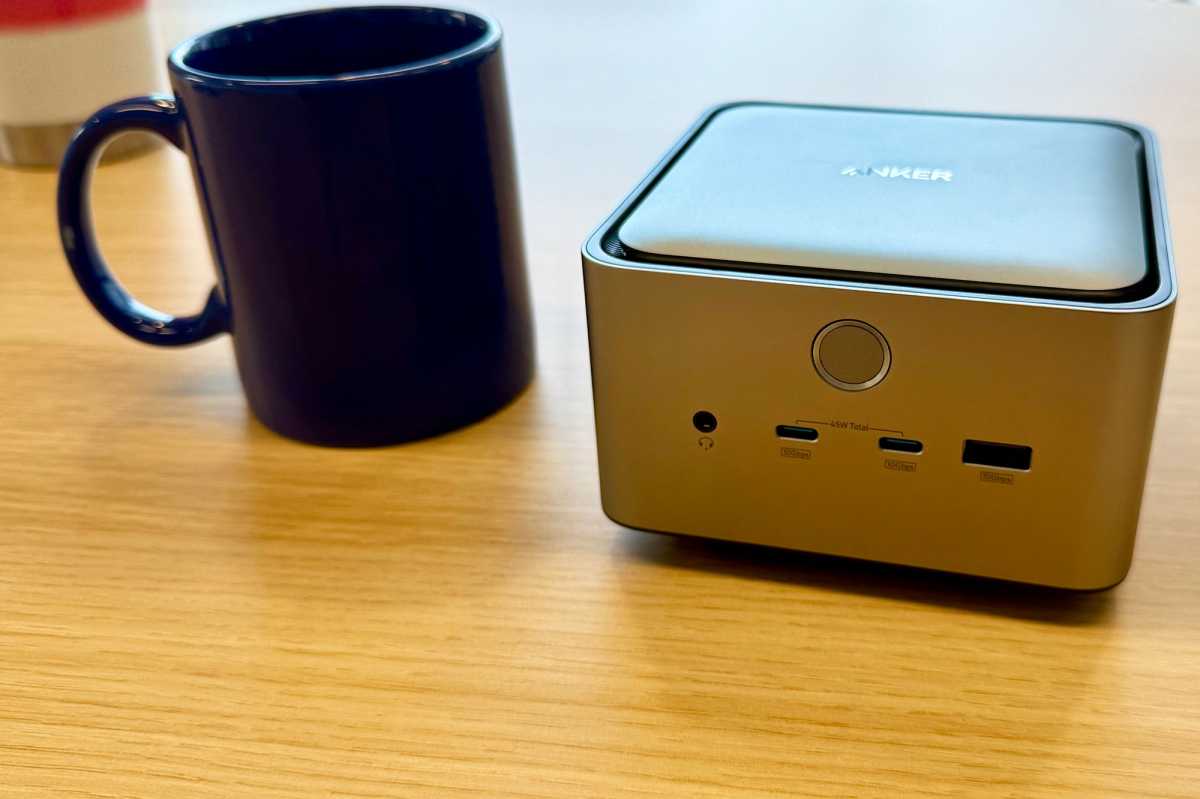
1 upstream Thunderbolt 5 port (80Gbps, 140W)
-
2 downstream Thunderbolt 5 ports (80Gbps, 15W)
-
1 HDMI 2.1 port
-
1 DisplayPort 2.1 port
-
2 USB-C ports (10Gbps, shared 45W)
-
3 USB-A ports (10Gbps, 1x 7.5W, 2x 4.5W)
-
1 Ethernet port (2.5Gb)
-
1 SD card reader (UHS-I, 104MBps)
-
1 microSD card reader (UHS-I, 104MBps)
-
1 3.5mm combo audio jack
This setup allows laptops, monitors, storage devices, and peripherals to connect seamlessly, reducing cable clutter.
🎨 Stunning 8K and 4K Display Support
The Anker TB5 dock supports single or dual-display setups, ideal for creative professionals and multitasking.
-
Single 8K display via HDMI 2.1 or DisplayPort 2.1
-
Dual 4K displays for Apple M-series Pro, Max, or M4 Macs
-
Windows PCs can utilize dual 8K or 4K displays depending on GPU support
With Thunderbolt 5’s 80Gbps bandwidth, users experience smooth, high-resolution graphics without lag.
💻 Thunderbolt 5 and Future-Proofing
Thunderbolt 5 is backwards compatible with USB-C, Thunderbolt 4, and 3.
-
Full 80Gbps speed for TB5 laptops
-
40Gbps compatibility for TB3/TB4 devices
-
Supports high-speed data transfer and video output simultaneously
-
Future-proof for the next-generation Macs and PCs
This ensures maximum investment protection as new devices are released.
🌡️ Cooling and LED Lighting
The dock includes active cooling and LED indicators:
-
Blue LED lights for a modern workspace aesthetic
-
Integrated fan system prevents overheating during high-load tasks
-
Temperature sensors protect connected devices
Work long hours safely without worrying about thermal throttling.
🔌 Power Delivery and Fast Charging
With 232W total power, the Anker TB5 dock can charge laptops, phones, tablets, and accessories simultaneously.
-
140W Thunderbolt 5 upstream port for laptops
-
45W shared across USB-C ports for phones and tablets
-
7.5W USB-A port can charge Apple Watch or small devices quickly
This dock ensures all devices remain fully powered during intensive workflows.
🏢 Professional Workflows and Multi-Device Integration
Ideal for professionals in design, video editing, and finance:
-
Dual monitors increase productivity and multitasking
-
Ethernet port provides stable wired network
-
SD/microSD readers support fast file transfers for photographers and editors
-
Audio jack connects headphones, speakers, or conference devices
A single dock replaces multiple adapters and chargers, streamlining your workspace.

🖱️ Creative Desk and Gaming Setups
The Anker Prime TB5 is perfect for:
-
Gaming setups with dual monitors and fast peripherals
-
Streaming studios requiring audio, Ethernet, and multiple device management
-
Video editing desks with high-speed drives and dual-display outputs
-
Remote working environments with laptops and smartphones
This makes it a versatile hub for all productivity scenarios.
🌐 Ethernet and Network Optimization
Supports 2.5Gb Ethernet for high-speed, stable connections:
-
Compatible with Cat5e, Cat6, Cat6a cables up to 100m
-
Backwards compatible with 1Gb networks
-
Ideal for online collaboration, video calls, and cloud work
🧳 Travel and Portability
While designed for desktop use, the compact aluminum form factor makes it:
-
Lightweight and easy to transport
-
Suitable for remote work, client meetings, or coworking spaces
-
Provides full desktop expansion wherever you go
📂 SD and MicroSD Card Readers
Supports UHS-I standard at 104MBps, ideal for:
-
Archiving photos and videos
-
Quick access to external storage
-
Affordable storage expansion
Note: Built-in MacBook card readers may offer faster UHS-II speeds, but the Anker TB5 is great for additional inexpensive storage.
🔧 USB-C and USB-A Data Transfers
-
10Gbps USB-C ports for external SSDs, drives, and accessories
-
USB-A ports handle keyboards, mice, memory sticks, and smaller devices
-
Front USB-C ports support charging and data, not video output
💡 Design and Build
-
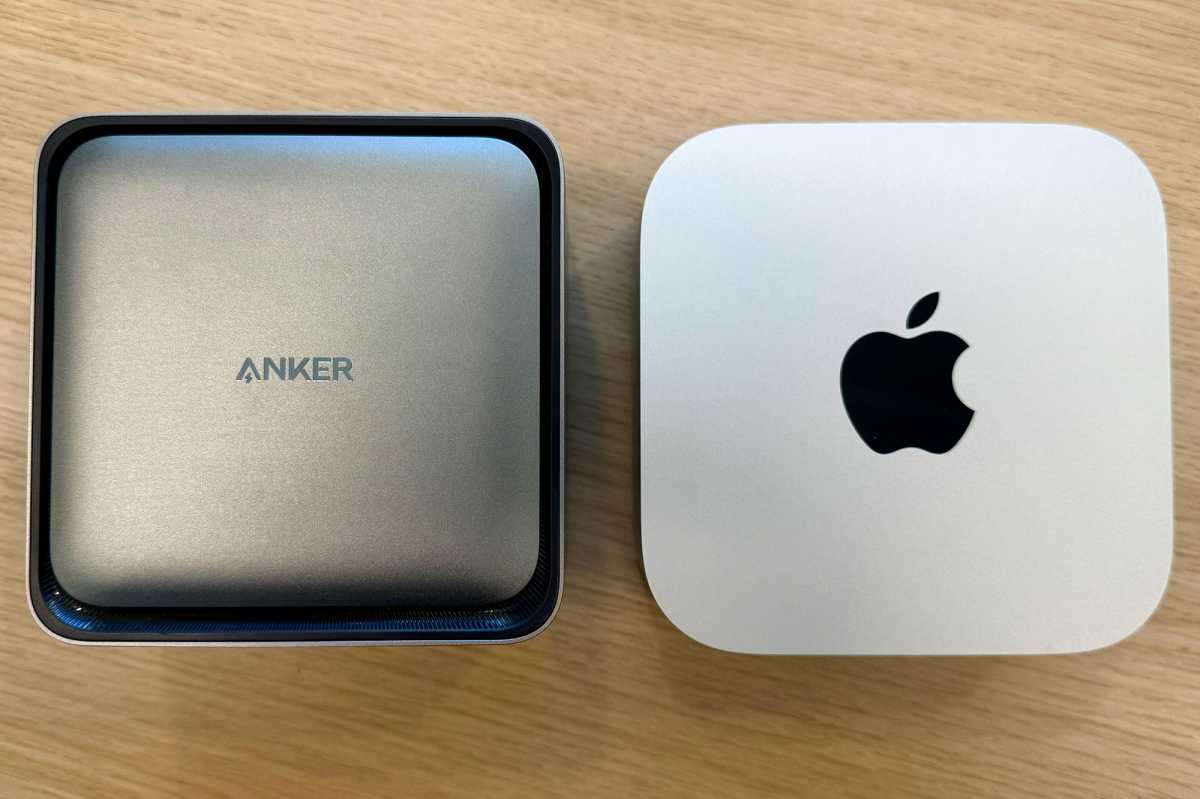
Aluminum finish matches Apple Mac mini/Studio
-
Compact dimensions: 4.6 × 4.6 × 3.0 in / 116 × 116 × 75 mm
-
Weighs 1.1kg, sturdy yet portable
-
Upstream port placed at the back for neat cable management
🔒 Compatibility
-
Supported systems: Windows 10 / 11, macOS 15 or later
-
Host devices: Thunderbolt 5 / 4 laptops
-
Unsupported: TB3 laptops for 8K, ChromeOS, Linux systems
-
Special notes:
-
HDMI 2.1 and DisplayPort 2.1 cannot be used simultaneously
-
Apple Silicon MacBooks have limitations on external displays
-
🏁 Summary – Why Anker Prime TB5 Dock is a Must-Have
The Anker Prime TB5 Docking Station (14-in-1, 8K, Thunderbolt 5) is:
✔ Future-proof with Thunderbolt 5
✔ Supports dual 8K or 4K displays
✔ 14 versatile ports for maximum connectivity
✔ 232W total power with fast-charging capabilities
✔ Active cooling and LED lighting
✔ Compact, professional, and premium aluminum design
✔ Ideal for professionals, creatives, gamers, and remote workers
🛒 Order now at Typeshop.pk with Cash on Delivery across Pakistan.
🖥️ Multi-Monitor Professional Workflows
The Anker Prime TB5 Dock allows professionals to maximize screen real estate for efficiency. Whether you are a video editor, graphic designer, or financial analyst, multiple display setups enhance productivity.
Ideal Multi-Monitor Configurations
-
Dual 8K displays for Windows PCs using HDMI + DisplayPort
-
Dual 4K displays for M-series MacBooks Pro/Max/M4 via Thunderbolt 5 + HDMI
-
Extended desktop mode for coding, editing, and live streaming
Benefits include simultaneous monitoring of multiple applications, improved multitasking, and reduced workflow delays.
🎨 Creative Studio Setups
For creators, the dock supports high-speed peripherals and ultra-fast storage access.
Use Cases
-
Video editing studios: Connect dual 4K/8K monitors, external SSDs, SD cards, and audio interfaces
-
Graphic design: Use drawing tablets, USB drives, and dual-display layouts for Photoshop and Illustrator
-
Photography: Fast SD/microSD transfer to external storage and simultaneous device charging
-
Music production: Audio jack connects speakers or headphones while USB-C ports power MIDI controllers
The dock centralizes all creative devices, reducing cable clutter and improving workflow.
🎮 Gaming and Streaming Advantages
The Anker TB5 Dock is perfect for high-performance gaming setups:
-
Dual 4K/8K monitors for immersive gameplay
-
Low-latency Ethernet for competitive online gaming
-
USB-A and USB-C ports for gaming keyboards, mice, controllers, and headsets
-
Thunderbolt 5 upstream/downstream allows fast SSD connection for game libraries
Gamers benefit from high-refresh-rate monitors, dual displays, and ultra-fast peripheral connections.
🏠 Home Office Optimization
Remote work has become mainstream, and a dock like this streamlines home offices.
Key Advantages
-
Consolidates all peripheral connections: monitors, keyboard, mouse, storage, and headphones
-
Compact footprint keeps desks tidy
-
Built-in power delivery charges laptop, tablet, and phone simultaneously
-
Ethernet connection ensures stable internet for video calls
Ideal for productive and professional home setups.
🔌 Power Management and Charging Efficiency
The Anker Prime TB5 Dock provides intelligent power allocation:
-
Up to 140W Thunderbolt 5 upstream for laptops
-
Shared 45W USB-C charging for smaller devices
-
USB-A ports provide 7.5W/4.5W output, suitable for accessories like Apple Watch
-
232W total output keeps all devices powered simultaneously
This eliminates the need for multiple chargers and power strips, making desk management seamless.
🌡️ Active Cooling for High-Performance Tasks
With powerful internal cooling and LED indicators:
-
Keeps devices safe during high-load tasks like video rendering
-
Reduces thermal throttling for laptops and connected peripherals
-
Blue LEDs enhance workspace visibility and aesthetics
Even extended gaming or creative sessions remain smooth and safe.
🧳 Travel-Friendly Expansion Hub
While designed for desktops, the compact aluminum design makes it portable for travel:
-
Fits into backpacks or laptop bags
-
Enables remote professional setups with dual-display support
-
Centralizes charging, data transfer, and connectivity wherever you go
Perfect for digital nomads, business travelers, and off-site creative professionals.
🌐 Ethernet and Network Speed Optimization
The 2.5Gb Ethernet port ensures fast, stable, wired connections:
-
Backwards compatible with 1Gb networks
-
Supports cloud-based work, large file transfers, and video streaming
-
Ideal for gaming, remote office, and media production
Cables must be Cat5e or higher and under 100 meters to maximize speed.
📂 Storage Expansion with SD and microSD
-
SD/microSD slots support UHS-I up to 104MBps
-
Perfect for backup, storage, and archiving
-
Enables fast transfers from cameras, drones, or external devices
-
Useful for MacBook Air users without built-in card readers
While not as fast as UHS-II, these slots are affordable and functional for everyday workflows.
🔧 USB-C and USB-A Ports for Maximum Utility
-
Thunderbolt 5 downstream ports support high-speed devices or secondary monitors
-
Front USB-C ports handle data and charging for phones, tablets, and small laptops
-
USB-A ports allow connection of keyboards, mice, memory sticks, and accessories
This ensures maximum connectivity for all peripheral types without clutter.
🖱️ Optimized Desk Management
-
Vertical aluminum design reduces footprint
-
Upstream TB5 port at the back prevents messy cables
-
Integrated cooling ensures safe operation in high-density setups
-
LED lighting adds modern aesthetics to professional or gaming desks
This dock is a central hub for productivity, entertainment, and professional workflows.
💡 Advanced Tips for Optimizing TB5 Dock
-
Always use certified Thunderbolt 5 cables for full performance
-
Configure dual monitors via Dock Manager for optimal power allocation
-
Connect laptops and tablets first, then peripherals, to prioritize power
-
Use Ethernet for large file transfers instead of Wi-Fi
-
Regularly check firmware updates via Anker Dock Manager
🖼️ Video Editing and Design Workflow Optimization
For video editors and designers, the dock provides:
-
Dual monitor editing setups for Adobe Premiere Pro, Final Cut Pro, and DaVinci Resolve
-
High-speed access to external SSDs via Thunderbolt 5 or USB-C
-
Real-time preview on multiple displays with minimal latency
-
Integrated SD/microSD card slots for fast media import
-
Dedicated audio jack for headphones and speakers during editing sessions
By consolidating devices, the dock reduces setup time and allows editors to focus on creative work.
🎮 Gaming Workflow and Streaming Enhancements
Gamers can maximize performance with:
-
Dual 4K or 8K monitors for immersive gameplay
-
High-speed Ethernet for low-latency online gaming
-
USB-A and USB-C ports for gaming keyboards, mice, and controllers
-
Thunderbolt 5 downstream ports for external SSDs or capture cards
Streamers can also connect microphones, cameras, and audio interfaces, turning the dock into a complete streaming hub.
🏠 Home Office and Remote Work Setup
The Anker TB5 Dock is ideal for modern home offices:
-
Clean and organized desk with minimal cables
-
Stable wired internet for video conferencing
-
Simultaneous charging of laptop, smartphone, tablet, and accessories
-
Supports dual monitors for multitasking
This ensures efficient productivity and clutter-free environments, suitable for remote work, freelancing, or corporate setups.
🔌 Advanced Cable Management Tips
The dock’s vertical design supports smart cable routing:
-
Upstream Thunderbolt 5 cable routed to the back to avoid clutter
-
USB-A, USB-C, and audio cables can be organized through desk grommets
-
External monitors connected via HDMI or DisplayPort for clear display routing
-
Ethernet cable routed separately to maintain clean desk aesthetics
This minimizes cable tangling and enhances professional workspace appearance.
🧩 Mac and Windows Optimization
Mac Optimization:
-
Apple Silicon M-series Macs: Single external display support on M1/M2
-
Pro/Max/M4 Macs: Dual-display setups supported
-
Use Thunderbolt 5 ports for maximum speed and dual-display capability
-
Check macOS version (15+) for full compatibility
Windows Optimization:
-
Dual 8K or 4K displays supported depending on GPU
-
Thunderbolt 5 provides maximum bandwidth for external storage
-
Ethernet ensures stable network speeds for gaming or work-from-home
-
Compatible with laptops supporting DisplayPort Alt Mode
🧑💻 Professional Multi-Device Charging
The dock allows simultaneous charging for multiple devices:
-
Laptop: 140W via upstream Thunderbolt 5
-
Smartphone & Tablet: Shared 45W via USB-C ports
-
Accessories: 7.5W/4.5W via USB-A ports
-
Headphones or Apple Watch: Front USB-A port
This centralized charging system reduces desk clutter and ensures all devices are ready for use.
🧪 Advanced Data Transfer Capabilities
-
Thunderbolt 5: 80Gbps for high-speed SSDs or backups
-
USB-C ports: 10Gbps for secondary storage
-
USB-A ports: 10Gbps for memory sticks, peripherals, or small devices
-
SD/microSD slots: 104MBps for media transfers
Professionals handling large files or 4K/8K footage will benefit from fast and stable data transfers.
🔧 Tips for Optimal Performance
-
Always use certified Thunderbolt 5 cables for full performance.
-
Connect laptops first, then peripherals, to prioritize power.
-
Use the Dock Manager app to customize port usage and monitor power allocation.
-
For high-speed networking, connect via Cat6 or Cat6a Ethernet.
-
Keep the dock ventilated; avoid stacking with other devices.
-
Update firmware regularly for macOS and Windows compatibility.
-
Use HDMI/DisplayPort for monitors that require dedicated video signals.
❓ Anker Prime TB5 Docking Station FAQs (30-40 Short Answers)
Q1: Does it work with M4 Mac mini?
A1: Yes, fully compatible with Thunderbolt 5 M4 Mac mini.
Q2: Can I use HDMI 2.1 and DisplayPort simultaneously?
A2: No, only one video output at a time.
Q3: Is it backward compatible with TB4/3?
A3: Yes, speeds are limited to TB4/TB3 max.
Q4: What is the total power delivery?
A4: 232W across all ports.
Q5: Can I charge a 16-inch MacBook Pro?
A5: Yes, 140W Thunderbolt upstream supports it.
Q6: Can it power multiple iPhones?
A6: Yes, via USB-C ports and USB-A ports.
Q7: Ethernet speed supported?
A7: Up to 2.5Gbps, Cat5e/6/6a cables.
Q8: Does it support external GPUs?
A8: No, Apple Silicon Macs cannot use external GPUs.
Q9: Weight of the dock?
A9: 38oz / 1.1kg.
Q10: Dimensions?
A10: 4.6 × 4.6 × 3.0 in / 116 × 116 × 75 mm.
Q11: Can Windows laptops run dual 8K?
A11: Yes, depending on GPU support.
Q12: Are SD/microSD slots fast?
A12: UHS-I, 104MBps.
Q13: Front USB-C supports video?
A13: No, only data and charging.
Q14: Does it have LED indicators?
A14: Yes, blue LED lighting included.
Q15: Can it charge Apple Watch?
A15: Yes, via USB-A 7.5W port.
Q16: Can it be used with Linux?
A16: No, only Windows/macOS.
Q17: Maximum number of devices connected?
A17: 14 devices across all ports.
Q18: Cooling system included?
A18: Yes, active fan and thermal sensors.
Q19: Is it portable?
A19: Yes, compact aluminum design.
Q20: Does it work with TB3 laptops?
A20: Yes, but 8K output may not work.
Q21: Does it support gaming monitors?
A21: Yes, dual 4K/8K depending on system.
Q22: Can I connect two Thunderbolt monitors?
A22: Yes, with M-series Pro, Max, or M4 Macs.
Q23: Is it plug-and-play?
A23: Yes, no drivers required.
Q24: Can it fast charge iPad?
A24: Yes, via USB-C ports.
Q25: Maximum video output via HDMI?
A25: 4K 60Hz for TB5 Macs, up to 8K for Windows PCs.
Q26: Does it support MacBooks with M1?
A26: Only single external display supported.
Q27: Can I connect external SSDs?
A27: Yes, USB-C and Thunderbolt ports.
Q28: Does it support wireless charging?
A28: No, wired only.
Q29: Can it run 144Hz monitors?
A29: Yes, depending on TB5 GPU and display.
Q30: Warranty?
A30: 24 months standard with Anker support.
Q31: Can it charge two laptops at once?
A31: Only smaller devices via USB-C, one main laptop via TB5 upstream.
Q32: Is the design Mac-like?
A32: Yes, aluminum finish similar to Mac mini/Studio.
Q33: Does it include Thunderbolt 5 cable?
A33: Yes, included in the box.
Q34: Can it be stacked with other docks?
A34: Not recommended due to airflow and heat.
Q35: How fast is USB-C data transfer?
A35: 10Gbps per port, 45W shared for charging.
🏁 Why Professionals Choose Anker Prime TB5 Dock
-
Future-proof Thunderbolt 5 technology
-
Supports 14 devices simultaneously
-
8K and 4K display support for creative and gaming workflows
-
High-power delivery up to 232W
-
Active cooling and LED lighting for safe long sessions
-
Compact aluminum design fits modern professional and home offices
🛒 Get it now on Typeshop.pk with Cash on Delivery across Pakistan.
Anker 14 in 1 docking station price in pakistan
Thanks For Visiting Typeshop.pk




Reviews
Clear filtersThere are no reviews yet.