

All Categories

Samsung Galaxy XR price in Pakistan

 599,999

0 People watching this product now!

Payment Methods:

Typeshop.pk

Description

Samsung Galaxy XR price in Pakistan

Worlds Wide Open

Galaxy XR opens new realities of immersive entertainment, intelligently curated just for you. Watch, work and play with AI at your side. Use your hands and voice to pull up information about what’s on screen or in your space. It’s a way to step inside whole new worlds without leaving yours.

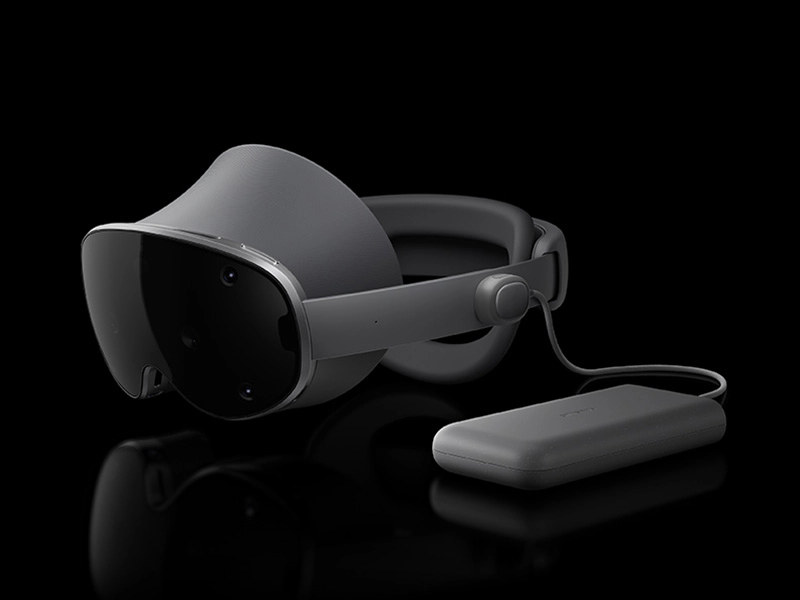
Galaxy XR slowly appears with a close-up of the Visor window on the front of the device. The device turns horizontally to showcase the right Side band, then the Rear fit dial on the back, followed by a close-up of the lenses and the display on the front inner part of the device behind the Visor window. Then, the device turns to show the Power connector on the left Side band, and again to the front to highlight the six cameras on the Visor window.

Galaxy XR slowly appears with a close-up of the Visor window on the front of the device. The device turns horizontally to showcase the right Side band, then the Rear fit dial on the back, followed by a close-up of the lenses and the display on the front inner part of the device behind the Visor window. Then, the device turns to show the Power connector on the left Side band, and again to the front to highlight the six cameras on the Visor window. Samsung Galaxy XR price in Pakistan

Samsung Galaxy XR price in Pakistan

Samsung Galaxy XR price in Pakistan

Expansive experiences,
enhanced by AI

A view no ticket can buy
Typeshop.pk

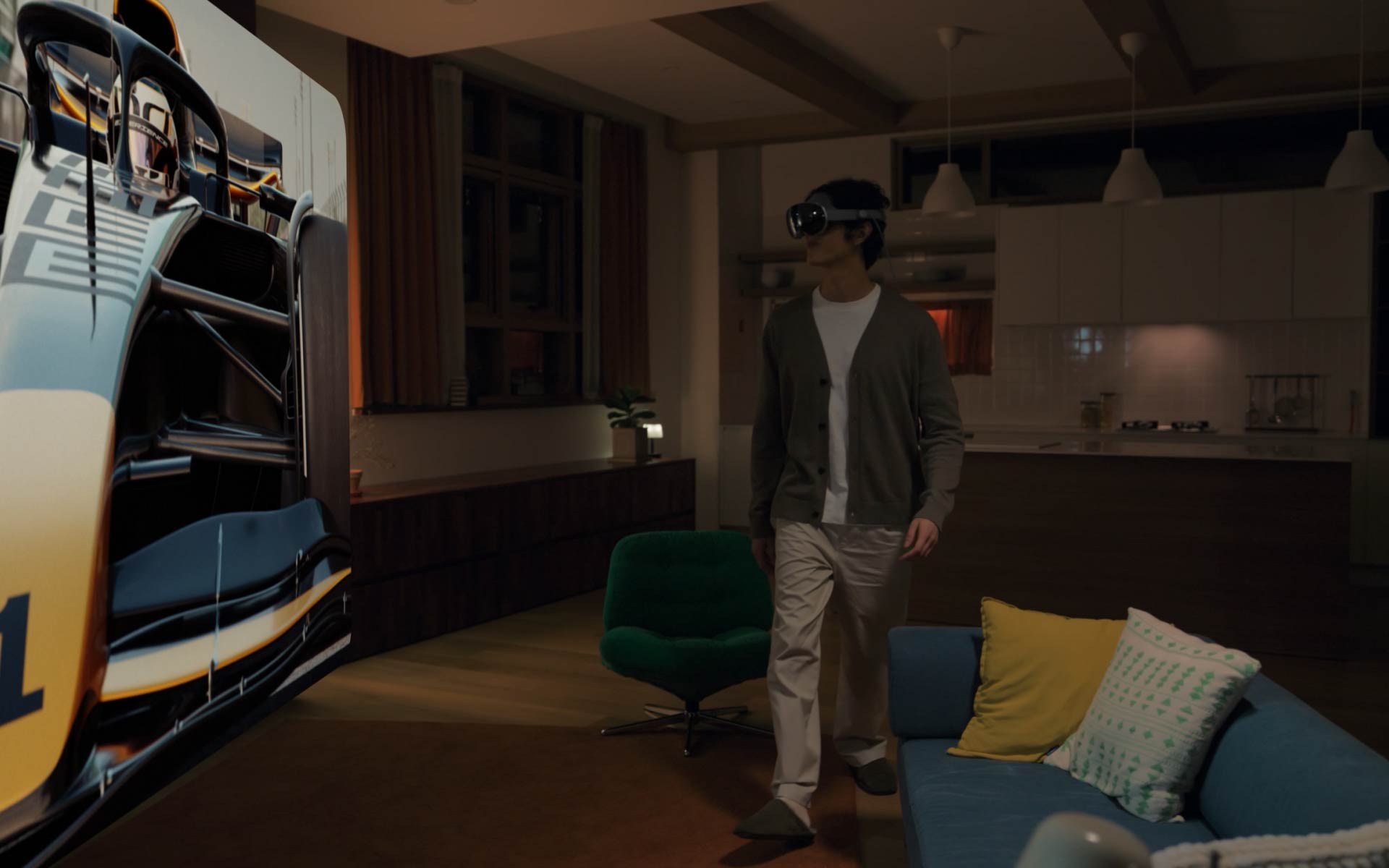
A young man wearing Galaxy XR sits on a sofa in the living room while watching an F1 racing competition on the expansive screen of Galaxy XR in front of him. Rear view of the man on the sofa watching an F1 car racing at high speed on the screen of Galaxy XR. Close-up of the man wearing Galaxy XR immersed in the hyper-realistic view. The man is standing in the living room wearing Galaxy XR and using Galaxy XR Controllers to play a tennis game against a virtual opponent on Galaxy XR, in which the movement of the tennis racquet corresponds to the movement of the Controllers.

Enter a new dimension of movies, sports and gaming. Galaxy XR places massive virtual displays right in your space for cinematic experiences, anywhere. Go deeper with 360-degree content and Spatial Audio that put you in the driver’s seat without leaving the couch.

Relive memories in 3D
Typeshop.pk

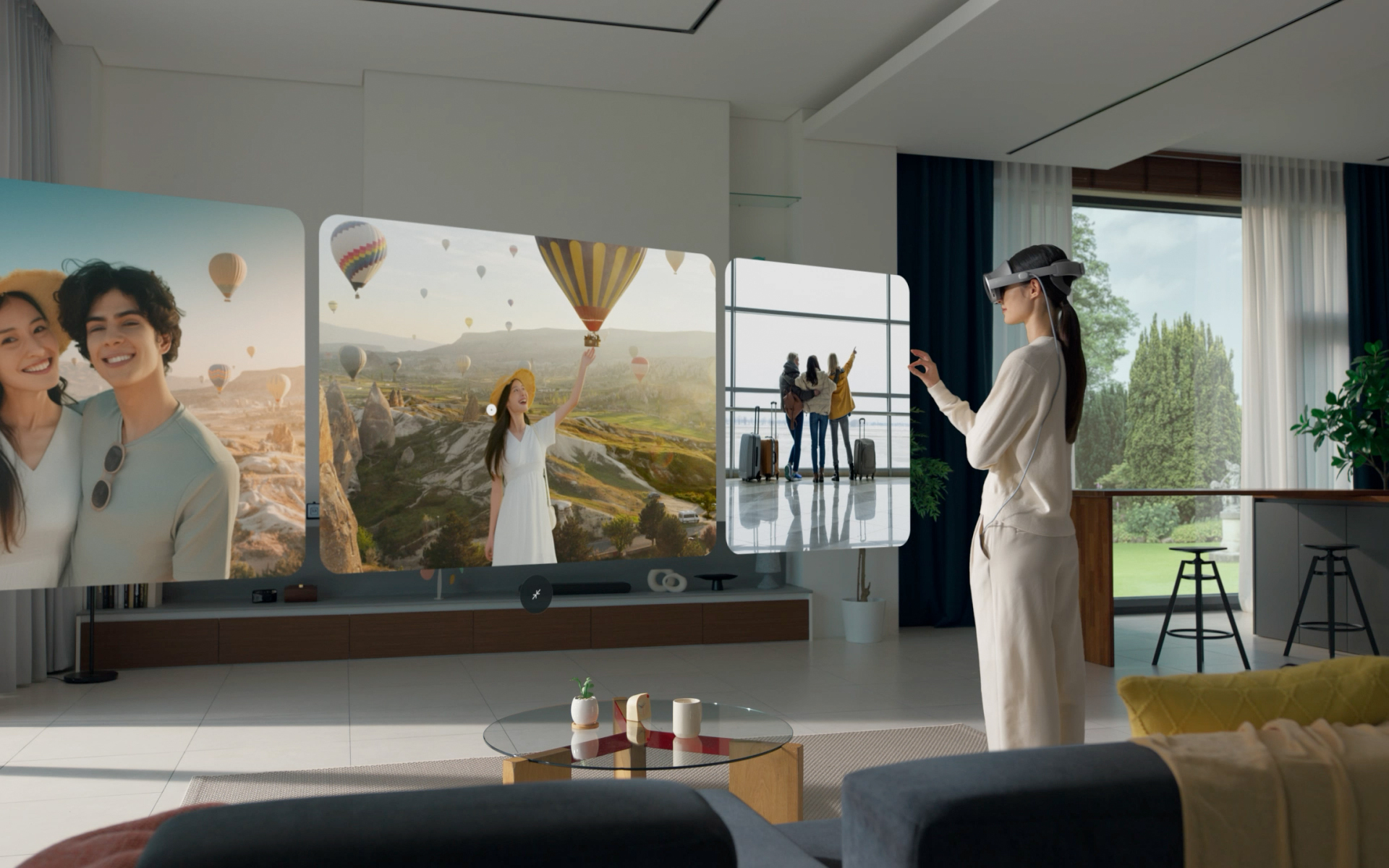
A young woman standing in a living room is wearing Galaxy XR and using hand gestures to swipe between travel photos and videos in the Google Photos app open on Galaxy XR. The woman uses hand gestures on one selected video to turn it into a 3D video. The immersive 3D video is shown on the expansive Galaxy XR screen, then the woman stands up from the living room sofa and extends her hand towards one of the hot-air balloons in the video, trying to touch it. Rear view of the woman viewing the immersive Galaxy XR screen in front of her. Google Photos logo shown.

Samsung Galaxy XR price in Pakistan

View your 2D photos or videos with added depth and dimension on Galaxy XR. Experiencing memories in Google Photos app1 using Media Auto-Spatialization is the closest thing to actually being back in the moment.

Explore with Gemini at your side

Typeshop.pk
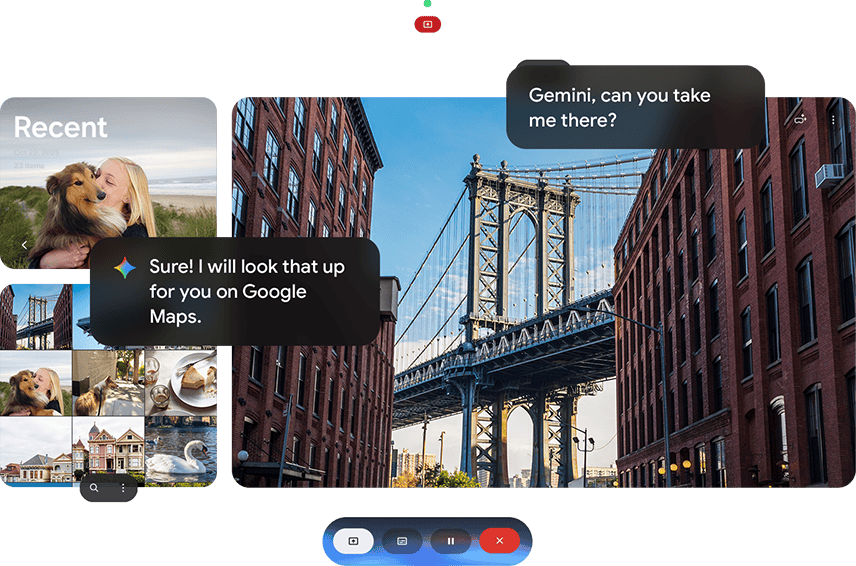
Galaxy XR gallery app opened onscreen. The user asks Google Gemini to take them to the place on the photo with text ‘Gemini, can you take me there?’ and Gemini replies with text ‘Sure! I will look that up for you on Google Maps.' Google Gemini logo is shown.

Soar over real-world 3D maps in Immersive View. Then swoop down to take a closer look in Street View with Google Gemini as your tour guide. Use Circle to Search or voice assistance with eye tracking3 to discover hidden gems and take travel planning to totally new places.

  • Samsung Galaxy XR price in Pakistan

Experience apps
in a whole new way

Go beyond taps on a screen and interact with your everyday apps on another level. Powered by the new Android XR operating system, Galaxy XR supports all your favorites plus a growing list of exclusive partners.Typeshop.pk
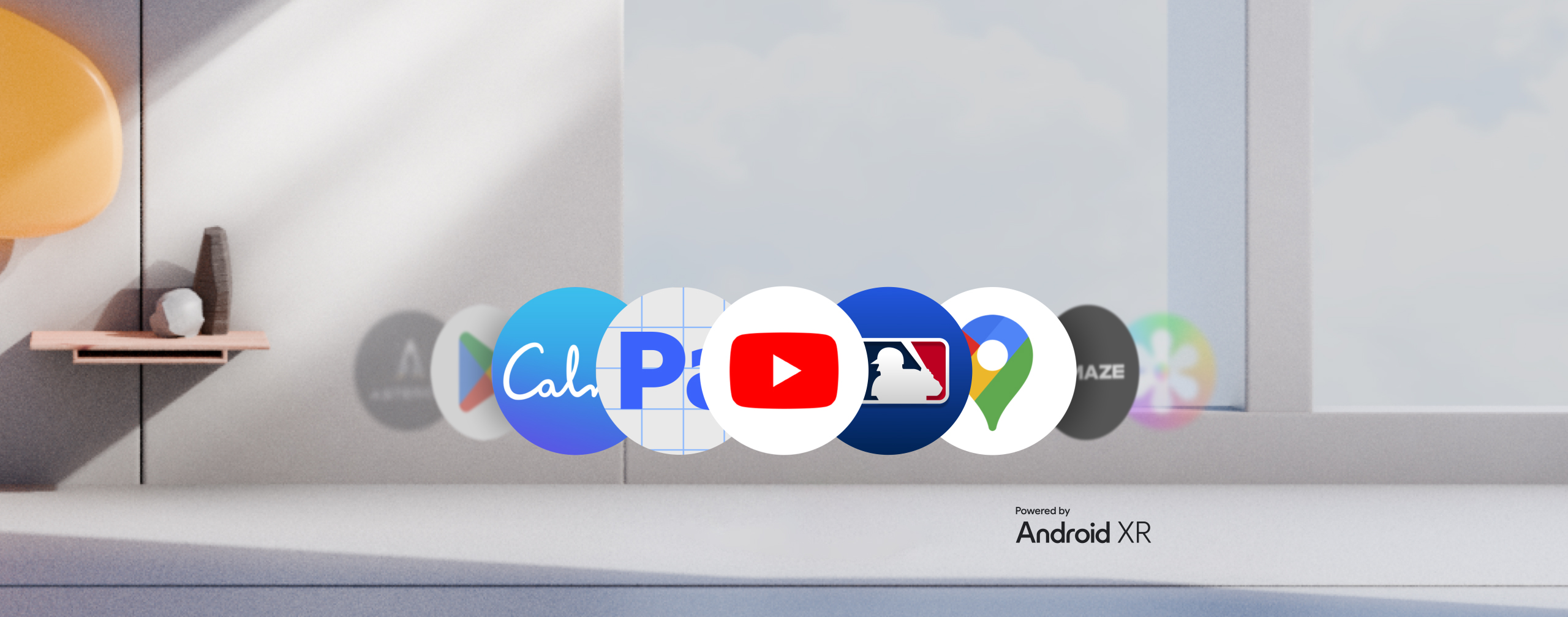
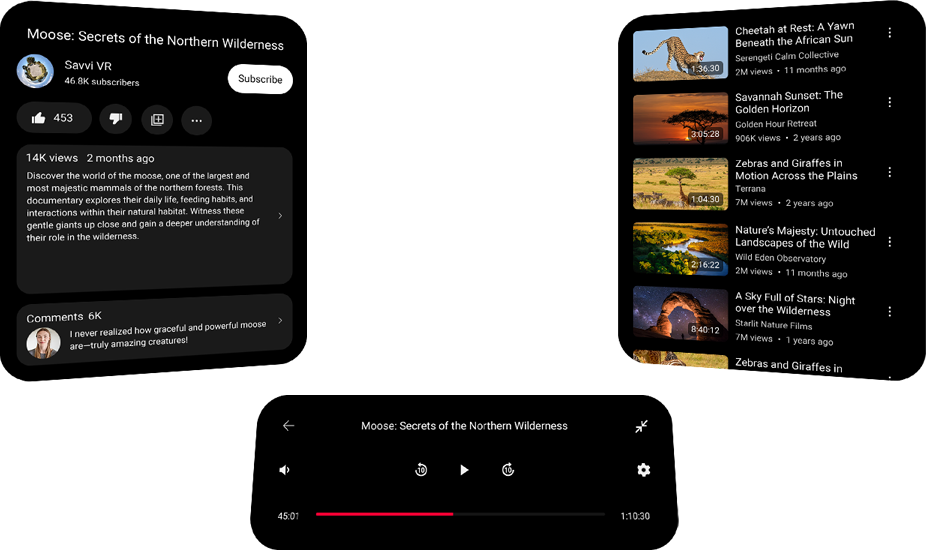
Various Galaxy XR app icons appear in a line including Google Play, Calm, Adobe Pulsar, YouTube, MLB, Google Maps, Amaze VR and more. Text ‘Powered by’ and Android XR logo.


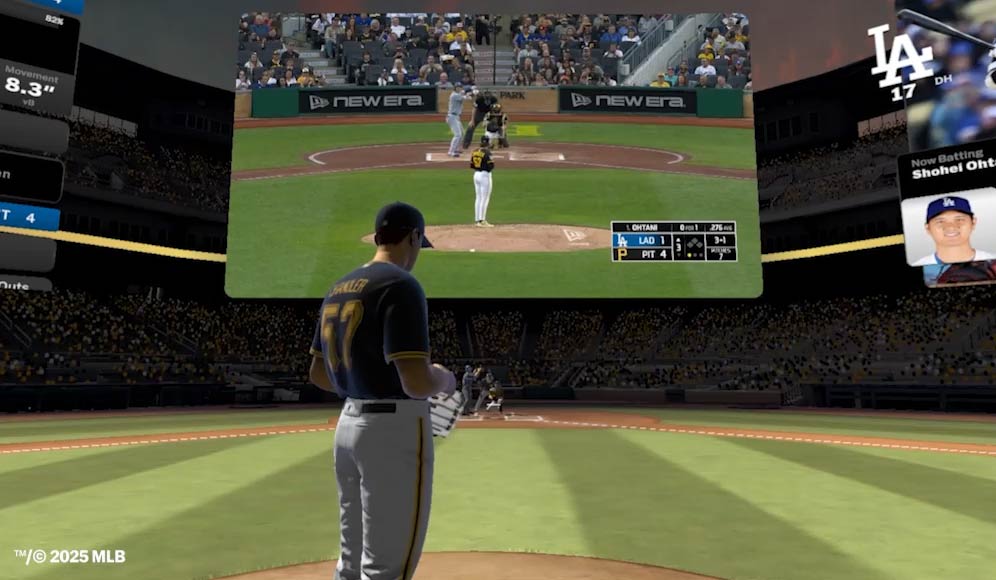
  • Spend a day at the ballpark in the new MLB XR app. Watch MLB games live and on-demand in an immersive environment with play-by-play data from Statcast.Typeshop.pk

    MLB game between Bubba Chandler from the Pittsburgh Pirates and Shohei Ohtani from the Los Angeles Dodgers is playing in one virtual screen on Galaxy XR, and around it a spatial visualization of the game recreates the environment from the perspective of the players and from above with close-up and far-away 3D views, live game stats, dynamic data and immersive elements for an enhanced sports game experience

    Comfort without

compromise

Forehead cushion

Provides a snug, breathable fit that’s adaptable to your face shape — even after long sessions.

Side band

Protects pressure-sensitive areas and keeps the headset stable and comfortable.

Rear cushion and fit dial

Adjusts to your head shape so you can find your precise fit and viewing angle.

Samsung Galaxy XR price in Pakistan

Get inside the action

Front row sights

Get that courtside feeling without leaving the house. 4K Micro-OLED displays deliver true-to-life colors and ultra-high pixel density that bring you closer to every play.

Spatial sound all around

Hear every cheer with Spatial Audio. Integrated two-way speakers add dimension and direction to your audio so you can hear like you’re there.Samsung Galaxy XR price in Pakistan
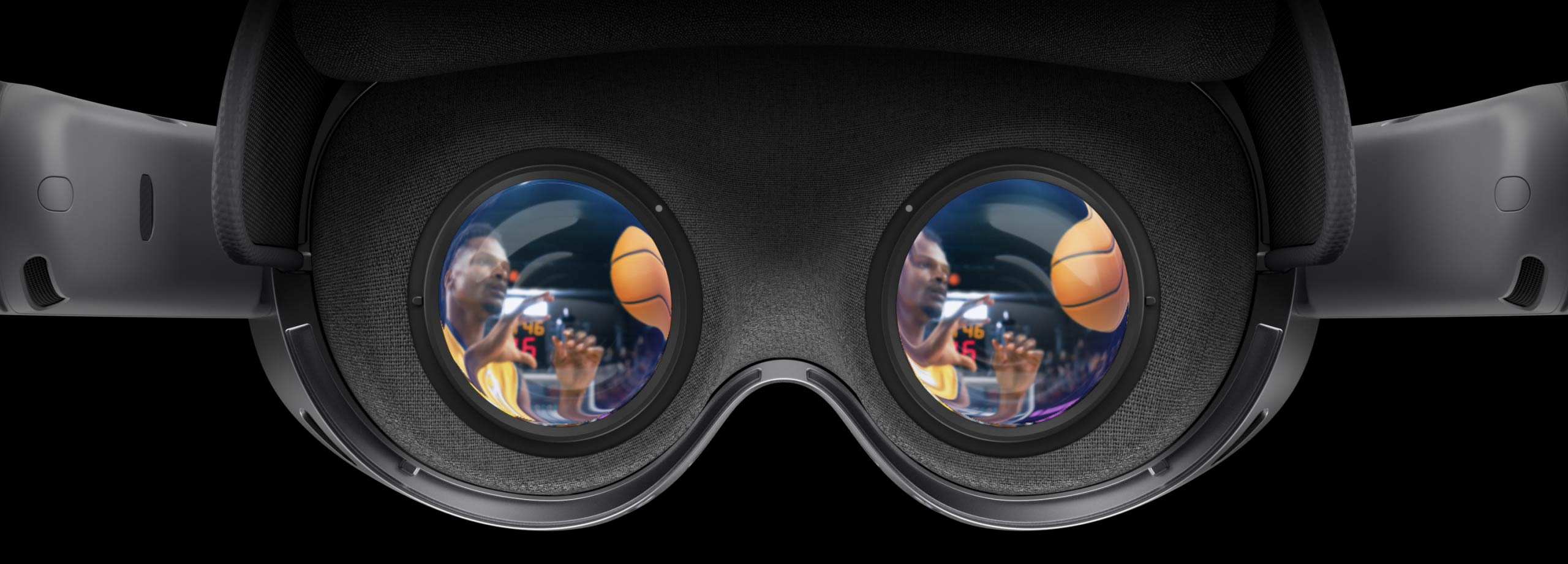
Galaxy XR seen from a user’s point of view behind the display and lenses when the device is on. The user’s vision goes through the lenses and the display reveals an immersive basketball game in a crowded arena with sound waves across the screen, showcasing the high-resolution, realistic visuals and 3D sound of the device.

Interactions
made intuitive

Precise control always at hand

Use your hands, eyes and voice to control Galaxy XR. Make a hand gesture to select an object, or simply look at a menu to open it. Advanced sensors let you interact with your world effortlessly.

Eye Tracking

Get in the game with
Galaxy XR Controllers

Power behind
the scenes

Quick swap battery

Connect the external battery with just one click to power up to 2.5 hours of immersive video playback. When not connected, use it to charge other compatible devices as a portable battery pack.

Video playback up to

2.5hrs
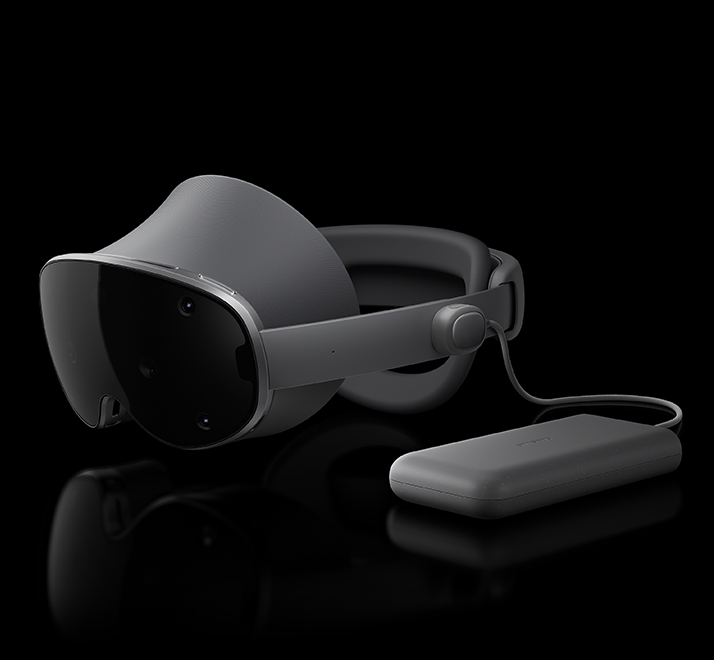
Galaxy XR is placed horizontally facing slightly left with the lightweight external battery pack placed next to the device and connected via the Power connector.

Lifelike XR powered by Snapdragon®

The Snapdragon® XR2+ Gen 2 chipset delivers 15% higher GPU and 20% higher CPU performance than previous generations. It seamlessly powers spatial audio, gesture tracking, AI assistance and stunning 4K visuals at unreal speeds.7

  1. upports JPG, PNG, WEBP, GIF, AVIF, HEIC, and most RAW files, and video formats MP4, MOV, M4V, AVI, MKV, and 3GP. accuracy. Google, Google Photos and Gmail are trademarks of Google LLC.
  2. Compatible with select apps. Requires Google Gemini account. Results may vary based on input; check responses for accuracy. Google and Gemini are trademarks of Google LLC.
  3. Glasses and prescription contacts may impact the precision of eye tracking. For best results, purchase lens inserts (sold separately);
  4. Some apps may not function properly or have limited feature availability.
  5. Optional gaming controller sold separately.
  6. Video playback tested with Wi-Fi connected turned on and 2D video playback from YouTube playing in a virtual environment. Actual battery life varies by network environment, features and apps used, device settings, the number of times charged, and many other factors.
  7. Snapdragon and Qualcomm branded products are products of Qualcomm Technologies, Inc. and/or its subsidiaries.
  8. Requires Galaxy Book with Windows 11. Devices must be logged in to the same Windows and Samsung account on both devices and have a Bluetooth and WiFi connection.
  9. Requires smartphone with One UI 6.1 and above. Devices must be logged-in to the same Samsung account and be on the same Wi-Fi network.
  10. Weight includes headset and forehead cushion.
  11. Samsung Galaxy XR price in Pakistan
FAQs about Samsung Galaxy XR Price in Pakistan

  1. What is the price of Samsung Galaxy XR in Pakistan?

    • The Samsung Galaxy XR is priced at ₨ 599,999 at Typeshop.pk. You can explore various payment options for a seamless purchase experience.

  2. Where can I buy Samsung Galaxy XR in Pakistan?

    • You can purchase the Samsung Galaxy XR online from Typeshop.pk, which offers convenient payment methods, quick delivery, and discounts on the device.

  3. What are the main features of Samsung Galaxy XR?

    • The Samsung Galaxy XR features a unique design with six cameras, an immersive display, spatial sound, and precise eye-tracking controls. It’s powered by Snapdragon® XR2+ Gen 2 for enhanced performance.

  4. Is the Samsung Galaxy XR compatible with 360-degree content?

    • Yes, the Galaxy XR supports 360-degree videos and immersive experiences that make it perfect for watching sports, movies, and gaming in a new dimension.

  5. How long does the battery last on the Samsung Galaxy XR?

    • The Samsung Galaxy XR offers up to 2.5 hours of immersive video playback. It also comes with an external battery pack that doubles as a power bank.

  6. What is the operating system of Samsung Galaxy XR?

    • The Samsung Galaxy XR operates on the Android XR system, offering enhanced performance and compatibility with popular apps like Google Photos, YouTube, and more.

  7. Can I use Samsung Galaxy XR for gaming?

    • Yes, Samsung Galaxy XR is perfect for gaming with its powerful Snapdragon® XR2+ Gen 2 chipset and immersive 4K visuals. It also supports gesture controls for an intuitive gaming experience.

  8. What is the unique feature of Samsung Galaxy XR’s camera system?

    • The Galaxy XR features six cameras, including a depth sensor and eye-tracking capabilities, for an enhanced augmented reality experience and precise interaction.

  9. Can I experience 3D videos on Samsung Galaxy XR?

    • Yes, you can view 3D videos using the Google Photos app on the Galaxy XR. The device adds depth and dimension to 2D photos and videos for a lifelike experience.

  10. Does Samsung Galaxy XR support voice commands?

    • Yes, you can use voice commands to control the Galaxy XR. With the help of AI assistants like Google Gemini, you can pull up information and control your device with just your voice.

  11. How does the Samsung Galaxy XR enhance sports viewing?

    • Samsung Galaxy XR offers a front-row experience with immersive 4K Micro-OLED displays and Spatial Audio, making sports games feel more realistic with dynamic visuals and sound.

  12. Is Samsung Galaxy XR suitable for virtual reality experiences?

    • Absolutely! Samsung Galaxy XR is designed for immersive VR experiences, offering a wide range of apps and games, powered by the latest Snapdragon chipset for seamless virtual interaction.

  13. What apps are compatible with Samsung Galaxy XR?

    • Samsung Galaxy XR supports popular apps such as Google Maps, YouTube, MLB, Calm, and more, enhancing your experience with features tailored for immersive use.

  14. Can Samsung Galaxy XR be used for virtual meetings?

    • Yes, Galaxy XR allows for immersive virtual meetings where you can interact and collaborate in virtual spaces, making remote work more engaging and effective.

  15. Does Samsung Galaxy XR offer real-time information during videos?

    • Yes, you can use voice commands to ask Google Gemini for real-time info about what’s on your screen, whether it’s during a movie, sports event, or any other content.

  16. What is the immersive experience like with Samsung Galaxy XR?

    • The Samsung Galaxy XR delivers expansive virtual displays for a cinema-like experience, enhanced with 360-degree content and spatial sound, allowing you to fully immerse yourself in the content.

  17. Does the Samsung Galaxy XR have a fit dial for comfort?

    • Yes, it includes a rear cushion and a fit dial, which allows you to adjust the device to your head shape, ensuring comfort for long sessions.

  18. How does the eye-tracking technology work on Galaxy XR?

    • The Galaxy XR uses four eye-tracking cameras to detect pupil position and predict gaze direction, allowing you to interact with menus and objects simply by looking at them.

  19. Can I use Samsung Galaxy XR without glasses?

    • Yes, the Galaxy XR offers an eye-tracking feature, but for the best accuracy, it is recommended to use lens inserts, available for purchase separately.

  20. Is Samsung Galaxy XR compatible with other Samsung devices?

    • Yes, the Samsung Galaxy XR can seamlessly connect with other Samsung devices, like the Galaxy Book and smartphones, as long as they are logged into the same Samsung account.

  21. How much does the Samsung Galaxy XR cost in other countries?

    • Prices may vary depending on the region and local taxes. Check your local retailers or online stores to get accurate pricing for the Samsung Galaxy XR.

  22. Can I return the Samsung Galaxy XR after purchase?

    • Most retailers, including Typeshop.pk, offer a return policy. Please confirm the specific terms and conditions regarding returns with the seller.

  23. What is the warranty period for Samsung Galaxy XR?

    • The warranty period typically ranges from 1 to 2 years, depending on the retailer. Check with your local seller for more details on warranty terms.

  24. Is the Samsung Galaxy XR suitable for kids?

    • While Samsung Galaxy XR offers immersive experiences, it is recommended for adult users due to its advanced technology and interactive controls.

  25. What accessories are available for the Samsung Galaxy XR?

    • Accessories include lens inserts for better eye-tracking accuracy, external controllers for gaming, and protective cases to keep your device safe during use.

  26. Can Samsung Galaxy XR be used for video calls?

    • Yes, the Galaxy XR supports video calls through apps like Zoom, Skype, and others, with immersive virtual backgrounds and spatial audio for a lifelike experience.

  27. How is the Samsung Galaxy XR’s sound quality?

    • The sound quality is exceptional with Spatial Audio, providing directionality and depth to the sound, making you feel like you’re in the middle of the action.

  28. Does Samsung Galaxy XR support 4K streaming?

    • Yes, the device is equipped with 4K Micro-OLED displays, allowing you to stream high-definition content seamlessly.

  29. Can I use Samsung Galaxy XR to create 3D content?

    • Yes, you can capture 3D photos and videos, and experience them in immersive depth using the device’s advanced sensors and AI integration.

  30. How do I update Samsung Galaxy XR software?

    • Software updates for the Galaxy XR are available through the device’s settings menu. Ensure that your device is connected to Wi-Fi and has sufficient battery before proceeding.

  31. Is Samsung Galaxy XR compatible with Android apps?

    • Yes, the Galaxy XR runs on Android XR and supports a wide range of Android apps, from gaming and media to productivity tools, enhanced for immersive interaction.

  32. What kind of content is best viewed on Samsung Galaxy XR?

    • The Galaxy XR excels in displaying immersive media like 360-degree videos, VR games, sports, and movies, providing a richer experience with spatial audio.

  33. Can I use my Samsung Galaxy XR with a Bluetooth headset?

    • Yes, the Galaxy XR supports Bluetooth connections, allowing you to pair it with compatible Bluetooth headsets for an enhanced audio experience.

  34. How do I charge the Samsung Galaxy XR?

    • The Galaxy XR comes with a quick-swap external battery, which connects easily to the device and can power it for up to 2.5 hours of immersive video playback.

  35. What makes Samsung Galaxy XR different from other VR devices?

    • The Galaxy XR stands out due to its advanced features like six cameras, immersive 4K displays, spatial sound, and intuitive controls using gestures, voice, and eye-tracking.

  36. Can I use Samsung Galaxy XR for virtual tourism?

    • Yes, with apps like Google Gemini, you can explore real-world 3D maps, take virtual tours, and use Street View to travel the world from your home.

  37. What is the display resolution of Samsung Galaxy XR?

    • The device features 4K Micro-OLED displays, delivering ultra-high pixel density and stunning visuals, perfect for immersive viewing.

  38. How does Samsung Galaxy XR support augmented reality?

    • Galaxy XR uses advanced depth sensors and eye-tracking technology to blend digital content seamlessly with the real world, providing an immersive AR experience.

  39. Can I connect Samsung Galaxy XR to a PC or laptop?

    • Yes, the Galaxy XR can be connected to a Galaxy Book or other devices with Windows 11 for enhanced productivity and media streaming.

  40. Is Samsung Galaxy XR compatible with other VR platforms?

    • While primarily designed for its own ecosystem, the Galaxy XR supports various VR apps and platforms, expanding its versatility in immersive content.

  1. How do I use hand gestures on Samsung Galaxy XR?

  • Samsung Galaxy XR allows you to control the device with hand gestures. Simply make a gesture in front of the screen to interact with apps or select items. This feature enhances ease of use and adds a level of immersion to the experience.

  1. Is Samsung Galaxy XR suitable for professional work?

  • Yes, the Samsung Galaxy XR is perfect for professional work, especially for remote meetings, virtual collaboration, and interactive presentations. The expansive display and intuitive controls make it a great tool for productivity.

  1. What kind of videos can I watch on Samsung Galaxy XR?

  • You can watch 2D, 3D, and 360-degree videos on the Samsung Galaxy XR. The device enhances your viewing experience with immersive visuals and spatial audio, making it ideal for cinematic experiences.

  1. Does Samsung Galaxy XR have a mobile app store?

  • Yes, Samsung Galaxy XR has access to the Google Play Store, where you can download a wide range of apps. It supports both standard Android apps and immersive, XR-optimized apps for enhanced functionality.

  1. How does Samsung Galaxy XR integrate with Google Photos?

  • With Samsung Galaxy XR, you can view your 2D photos and videos in 3D, adding depth and dimension to your memories. It uses Media Auto-Spatialization to enhance photos in Google Photos for a more lifelike experience.

  1. Can I take photos or videos with Samsung Galaxy XR?

  • Yes, Samsung Galaxy XR is equipped with multiple cameras for capturing photos and videos. The advanced depth sensors and lenses provide high-quality 3D imagery and immersive video recordings.

  1. What makes Samsung Galaxy XR unique compared to other VR headsets?

  • Galaxy XR stands out with its six cameras, including a depth sensor and eye-tracking cameras, making interactions more intuitive. The integration of spatial sound and 4K displays provides a richer immersive experience than other VR headsets.

  1. Does Samsung Galaxy XR support multiplayer gaming?

  • Yes, Samsung Galaxy XR supports multiplayer gaming. You can engage with friends or other users in virtual environments, making it an ideal device for interactive gaming sessions.

  1. Can I use Samsung Galaxy XR for fitness and exercise apps?

  • Yes, Samsung Galaxy XR can be used for fitness and exercise apps that are compatible with VR or immersive experiences. Apps like Calm and others offer a more engaging way to meditate, relax, and exercise using virtual environments.

  1. How does Samsung Galaxy XR improve the virtual shopping experience?

  • Samsung Galaxy XR enhances virtual shopping by allowing users to browse products in an immersive 3D space. You can interact with virtual store displays and check out items from different angles, providing a realistic shopping experience.

  1. Is Samsung Galaxy XR compatible with virtual fitness trainers?

  • Yes, Galaxy XR works well with virtual fitness trainers, providing a dynamic and immersive workout experience. You can follow exercise routines in a 3D virtual environment for a more engaging fitness session.

  1. What content is best enjoyed with Samsung Galaxy XR?

  • Samsung Galaxy XR is best for immersive content like movies, games, sports, and 360-degree videos. Whether you’re watching a live sports event or playing VR games, the immersive 4K display and spatial audio enhance the experience.

  1. How can I control apps with my voice on Samsung Galaxy XR?

  • You can control apps on Samsung Galaxy XR using voice commands. Simply say “Hey Google” or use other voice assistants to pull up information, control media, or navigate the device.

  1. How does Samsung Galaxy XR enhance the music listening experience?

  • With Spatial Audio, Samsung Galaxy XR offers an enhanced music listening experience, creating a 360-degree sound field that makes it feel like you’re right in the middle of the concert.

  1. Can Samsung Galaxy XR be used for educational purposes?

  • Yes, Samsung Galaxy XR can be a great tool for education. It supports immersive learning apps and virtual environments, making it an engaging way to study various subjects like science, history, and art.

  1. Can I watch YouTube videos in 360-degree view on Galaxy XR?

  • Yes, Samsung Galaxy XR allows you to watch YouTube videos in 360-degree view, providing a more immersive experience for videos that support this feature.

  1. How do I customize the virtual workspace on Samsung Galaxy XR?

  • Samsung Galaxy XR allows you to arrange virtual screens in any way you like, creating your own optimized workspace. You can organize apps, videos, and other content for a productive, customized environment.

  1. Does Samsung Galaxy XR support multitasking?

  • Yes, Samsung Galaxy XR supports multitasking by allowing you to open and interact with multiple apps simultaneously in the virtual space. This makes it ideal for productivity, gaming, and entertainment.

  1. Can I play augmented reality (AR) games on Samsung Galaxy XR?

  • Yes, Samsung Galaxy XR supports augmented reality (AR) games. The device’s depth sensors and camera system make it perfect for immersive AR gaming experiences.

  1. Is the Samsung Galaxy XR comfortable for extended use?

  • Yes, the Samsung Galaxy XR is designed for comfort with features like a breathable forehead cushion, side band for stability, and a rear cushion that adjusts to your head shape. It ensures a snug fit for long sessions.

  1. How does the spatial audio system work on Samsung Galaxy XR?

  • The spatial audio system in Samsung Galaxy XR creates a three-dimensional sound environment. It adjusts the audio to match the direction you’re looking at, enhancing the realism of the experience.

  1. Can Samsung Galaxy XR be used for virtual reality tourism?

  • Yes, Samsung Galaxy XR can be used for virtual reality tourism, letting you explore places around the world without leaving your home. The immersive displays and sound create a lifelike experience.

  1. What is the difference between Samsung Galaxy XR and traditional VR headsets?

  • Unlike traditional VR headsets, Samsung Galaxy XR offers a 4K display, spatial sound, and intuitive control through eye-tracking and hand gestures. Its immersive features are designed for both entertainment and productivity.

  1. What are the health benefits of using Samsung Galaxy XR?

  • Samsung Galaxy XR offers features like virtual relaxation environments, fitness apps, and calming sounds to help reduce stress, improve focus, and promote mental well-being.

  1. Is there any subscription required to use Samsung Galaxy XR?

  • While Samsung Galaxy XR does not require a subscription to use, certain apps and services like MLB XR or Google Gemini may have subscription fees for premium features.

  1. Can I use Samsung Galaxy XR for live streaming?

  • Yes, you can use Samsung Galaxy XR for live streaming, offering immersive virtual environments to engage with your audience and enhance the streaming experience with 360-degree content.

  1. Can Samsung Galaxy XR be used for digital art creation?

  • Yes, the device supports digital art creation in virtual spaces, offering tools and apps for artists to create immersive 3D art and interact with their work in a more dynamic way.

  1. Is Samsung Galaxy XR good for immersive storytelling?

  • Yes, Samsung Galaxy XR is excellent for immersive storytelling with its ability to present content in 360-degree videos, interactive storytelling, and spatial sound, making narratives come to life.

  1. How do I set up Samsung Galaxy XR for the first time?

  • Setting up Samsung Galaxy XR is simple. Follow the on-screen instructions to pair it with your device, sign in to your Samsung account, and connect to Wi-Fi for a seamless experience.

  1. Does Samsung Galaxy XR work with other Samsung products?

  • Yes, Samsung Galaxy XR integrates well with other Samsung devices, such as smartphones and laptops, for an enhanced multi-device experience and greater flexibility.

  1. Does Samsung Galaxy XR support social media apps?

  • Yes, Samsung Galaxy XR is compatible with social media apps like Facebook, Instagram, and Twitter, offering an immersive experience to view and interact with posts in a virtual space.

  1. Can I watch movies in 3D on Samsung Galaxy XR?

  • Yes, Samsung Galaxy XR allows you to watch movies in 3D, enhancing your viewing experience with depth and dimension. It transforms regular 2D content into immersive 3D for a more lifelike experience.

  1. How do I clean Samsung Galaxy XR?

  • To clean the Samsung Galaxy XR, use a soft microfiber cloth to wipe the lenses and screens. Avoid using harsh chemicals to preserve the quality of the display and lenses.

  1. What is the weight of Samsung Galaxy XR?

  • The Samsung Galaxy XR weighs approximately 1.2 kg, making it comfortable for extended use while remaining lightweight enough for ease of wear.

  1. Can I use Samsung Galaxy XR for fitness tracking?

  • Yes, Samsung Galaxy XR can be paired with compatible fitness apps to track your workouts in immersive environments, offering a unique and engaging way to track your fitness progress.

  1. How does the depth sensor on Samsung Galaxy XR work?

  • The depth sensor on Samsung Galaxy XR maps your surroundings, allowing the device to blend the digital world with the physical world for immersive augmented reality (AR) experiences.

  1. Is Samsung Galaxy XR compatible with Bluetooth headphones?

  • Yes, Samsung Galaxy XR is compatible with Bluetooth headphones, offering you the option to enjoy your immersive experience with high-quality wireless audio.

  1. Can I connect Samsung Galaxy XR to a smart TV?

  • Yes, you can connect the Samsung Galaxy XR to a smart TV via screen mirroring or other compatible apps, allowing you to share immersive content with others on a larger screen.

  1. What types of content can I create with Samsung Galaxy XR?

  • You can create immersive content like 3D videos, virtual reality experiences, and augmented reality art with the advanced cameras and sensors on Samsung Galaxy XR.

  1. Is the Samsung Galaxy XR compatible with iOS devices?

  • Samsung Galaxy XR is primarily designed to work with Android devices. However, it may support limited functionality with iOS devices through third-party apps.

  1. Can Samsung Galaxy XR be used for virtual reality education?

  • Yes, Samsung Galaxy XR is ideal for virtual reality education, providing immersive learning experiences for students. It can be used for interactive lessons in subjects like history, science, and art.

  1. How do I update Samsung Galaxy XR’s firmware?

  • To update the firmware on Samsung Galaxy XR, go to Settings > System Updates and follow the instructions to install the latest software updates for enhanced performance and features.

  1. What makes Samsung Galaxy XR a good device for remote work?

  • Samsung Galaxy XR offers a unique virtual workspace, enabling you to interact with apps and documents in an immersive environment. This makes it a powerful tool for remote work and virtual collaboration.

  1. Can I use Samsung Galaxy XR for 360-degree meetings?

  • Yes, Samsung Galaxy XR supports 360-degree meetings, offering a virtual space for remote collaboration and communication, making you feel like you’re in the same room with colleagues.

  1. Does Samsung Galaxy XR support voice-to-text?

  • Yes, Samsung Galaxy XR supports voice-to-text functionality, making it easier to dictate messages, take notes, or write content without typing.

  1. Can I use Samsung Galaxy XR for online shopping?

  • Yes, Samsung Galaxy XR enhances the online shopping experience by allowing you to interact with virtual store displays in 3D and view products in a more immersive way.

  1. What is the processor used in Samsung Galaxy XR?

  • Samsung Galaxy XR is powered by the Snapdragon® XR2+ Gen 2 chipset, which offers enhanced performance, 20% higher CPU performance, and 15% higher GPU performance compared to previous generations.

  1. Is Samsung Galaxy XR water-resistant?

  • No, Samsung Galaxy XR is not designed to be water-resistant. It is important to keep the device away from water to maintain its functionality and longevity.

  1. How can I pair Samsung Galaxy XR with my phone?

  • To pair Samsung Galaxy XR with your phone, ensure both devices are connected to the same Wi-Fi network. Follow the on-screen instructions to link your phone with the XR device for seamless integration.

  1. What is the resolution of the Samsung Galaxy XR display?

  • Samsung Galaxy XR features a 4K Micro-OLED display that offers ultra-high pixel density, providing crystal-clear visuals for an immersive viewing experience.

  1. How do I set up the Samsung Galaxy XR for gaming?

  • Setting up Samsung Galaxy XR for gaming is simple. Just install your favorite VR or AR gaming apps from the Google Play Store, and enjoy the game using hand gestures, eye tracking, and voice commands for enhanced control.

  1. Can I use Samsung Galaxy XR for virtual job interviews?

  • Yes, you can use Samsung Galaxy XR for virtual job interviews. The immersive display and spatial audio make it feel like you’re face-to-face with the interviewer, enhancing communication.

  1. How do I enable 360-degree content on Samsung Galaxy XR?

  • To enable 360-degree content on Samsung Galaxy XR, simply open a compatible video or app that supports 360-degree media. Use the touchpad, voice commands, or hand gestures to control the view.

  1. Can I watch Netflix on Samsung Galaxy XR?

  • Yes, you can watch Netflix on Samsung Galaxy XR. The device supports streaming services and offers an enhanced experience with its immersive display and spatial sound.

  1. Can I use Samsung Galaxy XR for virtual reality tours?

  • Yes, Samsung Galaxy XR is great for virtual reality tours. It lets you explore new places and experiences in 360 degrees, providing a lifelike and engaging way to travel virtually.

  1. How can I adjust the fit of the Samsung Galaxy XR?

  • Samsung Galaxy XR comes with adjustable cushions and a rear fit dial, allowing you to customize the fit for comfort and optimal viewing. Simply adjust the head straps and cushions to match your head shape.

  1. Does Samsung Galaxy XR support eye-tracking gaming?

  • Yes, Samsung Galaxy XR supports eye-tracking gaming. You can interact with the game environment by simply looking at objects or menus, making it a more immersive and intuitive gaming experience.

  1. Can I use Samsung Galaxy XR with glasses?

  • Yes, Samsung Galaxy XR is compatible with glasses. However, for the best eye-tracking results, it is recommended to use lens inserts, which are sold separately.

  1. What type of content is compatible with Samsung Galaxy XR’s spatial audio?

  • Spatial audio works seamlessly with movies, sports, games, and music on Samsung Galaxy XR, offering an enhanced audio experience that provides directionality and depth to the sound.

  1. How do I interact with Samsung Galaxy XR using my eyes? – Samsung Galaxy XR uses advanced eye-tracking cameras to detect where you’re looking. You can simply glance at a menu or object, and the device will automatically open or select it for you.

Samsung Galaxy XR price in Pakistan
Customer Reviews

0 reviews
0
0
0
0
0

There are no reviews yet.

Be the first to review “Samsung Galaxy XR price in Pakistan”

Your email address will not be published. Required fields are marked *

1 2 3 4 5
1 2 3 4 5
1 2 3 4 5

You have to be logged in to be able to add photos to your review.

Shopping cart
Sign in

No account yet?

Compare
Wishlist
0 items Cart
Menu